
I spent the last few months testing every AI podcast setup I could find, and I'm ready to share the workflow that actually stuck. Using Make.com as the automation backbone and DomoAI for voice and video generation, you can go from topic research to a published, professional-sounding podcast episode without recording a single thing yourself. This guide walks you through every step.
If you're new to Make.com, here's the short version: it's a visual automation platform that connects different apps and tools so they work together without you doing every step by hand. Think of it as a project manager that tells each tool in your stack when to do its job. You build "scenarios" — visual workflows where one action triggers the next.
And in 2026, Make.com has gotten seriously powerful. We're talking AI Agents that can reason and act on their own within rules you set, MCP (Model Context Protocol) support for connecting AI models to external tools, and a built-in AI Web Search feature for pulling real-time information. This isn't theoretical anymore. I tested it myself, and the results are real.
This is a real-world guide. I'll show you the exact tool stack, the step-by-step workflow, and the honest limitations. Let's get into it.
Why 2026 Is the Year AI Podcasting Actually Works
I've been watching AI podcasting tools for a while. Most of them felt like cool demos that fell apart when you tried to build a real production system. Here's what changed that made me take this seriously.
Make.com Is No Longer Niche
Make.com now serves over 400,000 organizations across 200+ countries. This isn't a scrappy startup tool anymore. It's infrastructure that serious businesses rely on. That matters because the integrations, reliability, and community support have all leveled up.
The 2026 Product Updates That Matter
A few specific updates made AI podcast automation realistic this year:
- Make AI Agents (open beta) — Available on all plans using Make's built-in AI provider. These agents don't just answer when you ask them something. They actively go out, gather information, make decisions, and take action on their own within rules you set. That's what "agentic workflows" means in plain language.
- Make AI Web Search — A built-in app for real-time information retrieval inside scenarios. Your podcast can reference what happened today, not just what's in a static database.
- MCP (Model Context Protocol) support — This lets you connect AI models to external tools with better context and precision. The newer Make AI Agents app supports adding knowledge, tools, scenarios, and MCP server tools.
- Improved AI Toolkit — Smarter built-in AI features for script generation, summarization, and content scoring.
Why "Governed Automation" Beats "Full Autonomy"
Here's something I found refreshing about Make's approach. Make's own data shows autonomous agents still complete less than 2.5% of tasks in real-world settings. Instead of promising a magic "AI does everything" button, Make focuses on structured workflows where you stay in control of quality and editorial decisions.
The bottom line for podcasters: you can now build a repeatable system where episodes practically produce themselves, but you decide what gets published.
What You Actually Need — The 2026 AI Podcast Tool Stack
Before diving into the how-to, here's every tool involved. I'll be honest — this is a multi-tool setup. The value of Make is that it stitches them together so you're not manually hopping between seven browser tabs.
- Make.com — The automation backbone. It connects everything below and runs the workflow on autopilot. Think of it as the project manager that tells every other tool when to do its job.
- RSS feed reader (Feedly or similar) — For pulling in source material. Make's official podcast automation workflow pulls articles via Feedly/RSS. Especially useful if your podcast covers news, trends, or curated topics.
- AI language model (OpenAI, Claude, or Gemini) — For writing scripts, summarizing sources, scoring article relevance, and generating episode outlines. Connected through Make's AI Toolkit or custom provider connections.
- DomoAI (TTS + Talking Avatar) — This is where the magic happens. DomoAI handles both text-to-speech audio AND video avatar generation in one place. I'll cover this in detail in the next section.
- Google Sheets — For storing approved topics, tracking episode status, and managing editorial queues. Simple but essential for keeping the pipeline organized.
- Podcast host (Spreaker or similar) — For publishing and distributing episodes. Honest note: Make connects to Spreaker via its HTTP module — there is no native app yet. It still works fine. It just requires one extra setup step.
- Repurposing tools (optional) — Transcript generators, social media schedulers, newsletter platforms. Make can push content to these automatically after an episode publishes.
How to Use DomoAI to Build a Full AI Podcast
Honestly, this is the step where I went from thinking "okay, this is a cool experiment" to "wait, this is actually production-ready."
The Problem With Most AI Podcast Setups
Most AI podcast workflows require three or four separate tools just to handle voice generation. You need one tool for text-to-speech, another for multi-speaker support, maybe a third for emotion control. And if you want video? Add even more tools on top. It gets messy fast.
DomoAI Closes That Gap
DomoAI handles both text-to-speech audio and video avatar generation in one platform. That single fact eliminated half the complexity in my workflow.
The March 2026 TTS Update — The Core Feature
This is the update that changed everything for me:
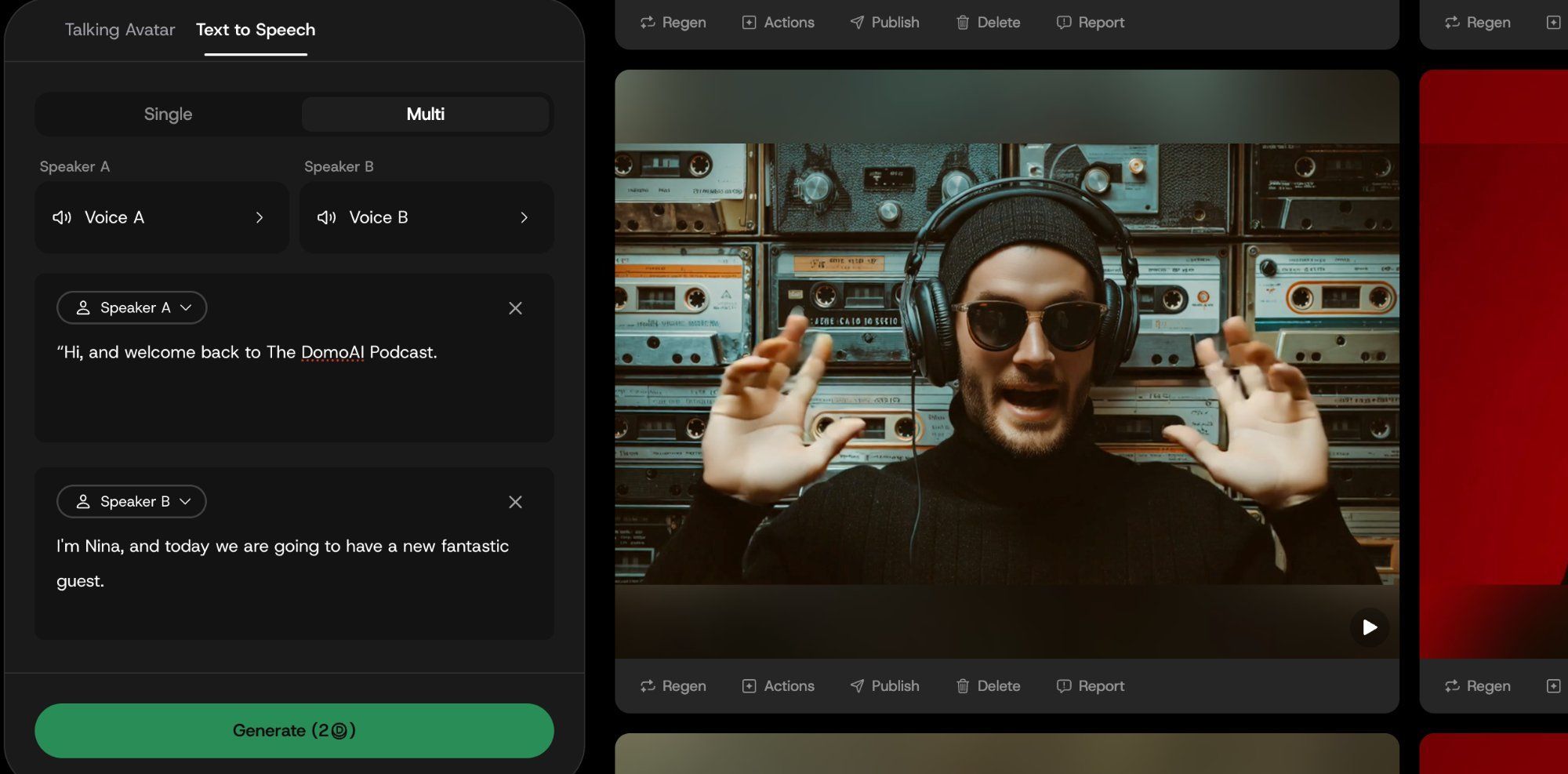
- You write one script with multiple speakers in a single document
- You assign emotions per line — a guest character sounds skeptical, the host sounds excited, a segment intro is delivered in a whisper
- The new natural voice model handles the delivery, and you control the tone through simple prompts
- The result: a two-person podcast created from a single text document, with no voice actors and no recording setup
I tested this with a two-speaker format — a host, a skeptical analyst. The emotion shifts sounded natural. Not perfect, but genuinely good enough for a published episode.
For Video Podcast Output
This is where it gets even better:
- Run the TTS audio through DomoAI's Text to Speech feature to generate an animated, lip-synced face for each speaker
- Use DomoAI's Frames to Video or Talking Avatar feature if you want visual narrative elements between speaking segments — product demos, b-roll sequences, illustrative scenes
- Upscale the final cut to 4K before publishing for a polished, professional look
The Complete DomoAI Workflow in One Line
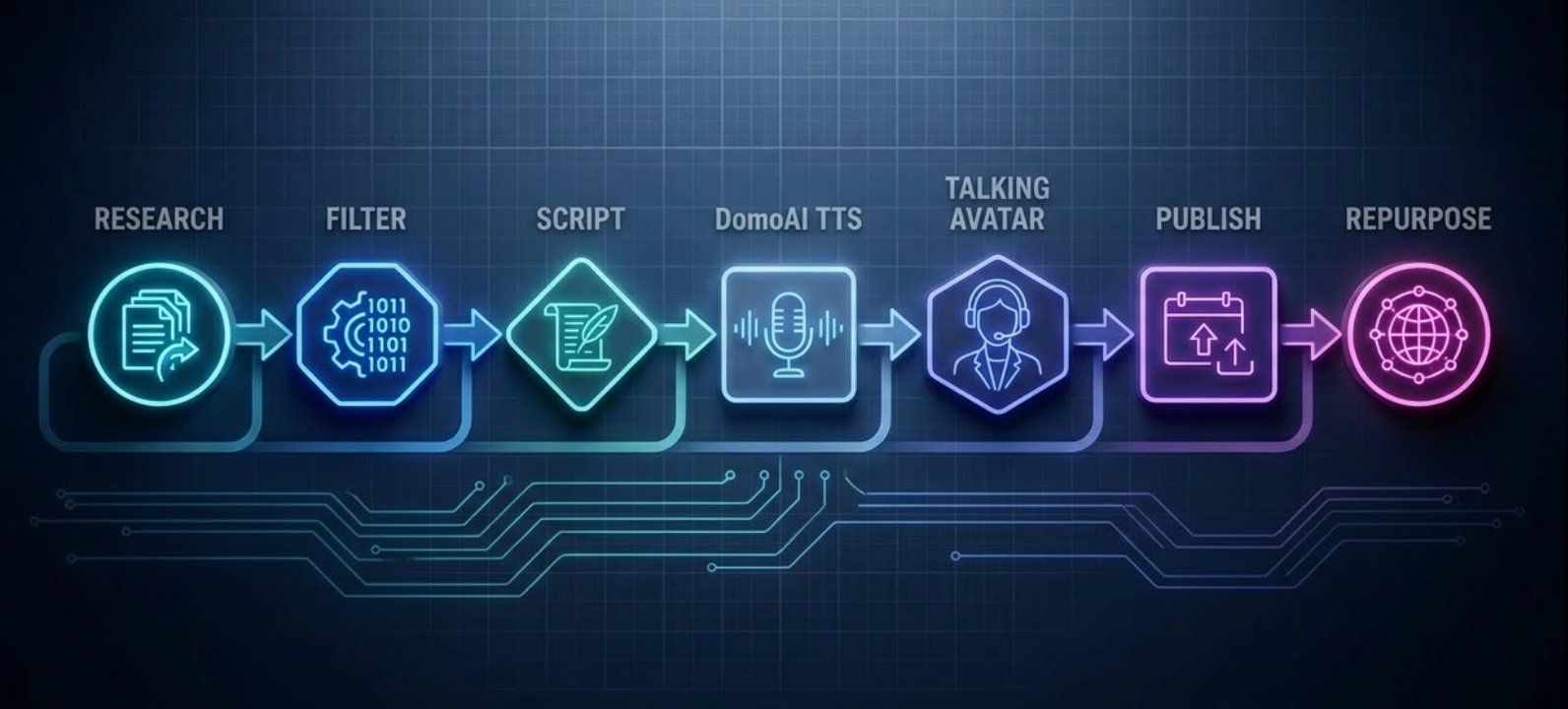
Script → TTS with emotion control → Talking Avatar → Frames to Video → Upscale → Publish
What used to require a voice actor, a video editor, stock footage subscriptions, and an upscaling tool is now handled inside one platform. That simplicity is why DomoAI earned its spot as the production layer in my workflow.
The Step-by-Step Workflow — From Research to Published Episode
Here's the full automated pipeline, in order. Each step connects to the next inside a single Make.com scenario.
Step 1: Research Intake
Set up RSS feeds (Feedly) inside Make to pull articles, news, or topic sources automatically. Add Make AI Web Search for pulling real-time information on trending topics that feeds might miss.
In plain language: Make checks your sources every hour (or whatever schedule you set) and collects potential episode topics.
Step 2: Filtering and Scoring
Use an AI model (through Make AI Agents or AI Toolkit) to score each source for relevance. Set rules: only topics scoring above a certain threshold move forward. Store approved topics in Google Sheets.
This is where the AI agent earns its keep. Instead of you reading 50 articles to find three good ones, the agent does it and explains its reasoning.
Step 3: Script Generation
Send approved topics to your AI model with a detailed prompt that defines your show format, tone, number of speakers, segment structure, and any editorial rules.
Make AI Agents now support attaching knowledge files — like a show style guide or legal disclosure template — so the AI follows your specific rules every time. I keep a "show bible" document attached that includes my intro format, segment length targets, and a list of phrases to avoid.
Step 4: Voice Generation With DomoAI TTS
Feed the script into DomoAI. Assign speaker roles and emotions per line. Generate the full multi-speaker audio file.
This step takes the longest to render, but it requires almost no manual effort. You set it up, and DomoAI handles the rest.
Step 5: Video Generation (Optional but Recommended)
Run the audio through DomoAI Talking Avatar for speaker visuals. Add Frames to Video segments for b-roll between speaking sections. Upscale to 4K for a polished final product.
If you're publishing to YouTube or social media, the video version dramatically increases reach.
Step 6: Publishing
Push the finished audio (or video) file to your podcast host via Make's HTTP module. An HTTP module is just Make's way of talking to apps that don't have a built-in connection yet — it sends data to the app's API (its communication door). Include episode title, description, and tags generated by the AI in Step 3.
Step 7: Repurposing
Automatically generate a transcript, pull key quotes for social media posts, create a newsletter summary, and schedule distribution — all from the same Make scenario.
Make's strongest value is as an orchestration layer — its official podcast guide relies on multiple external tools working together. The repurposing step is where that orchestration really pays off.
Who Is This Workflow Best For (And Who Should Skip It)
Best For
- Creators running news roundup or curated-topic podcasts
- Agencies managing multiple shows for clients
- Businesses that want an audio version of their existing newsletter or blog content
- Anyone building a content operation where episodes need to come out on a predictable schedule without manual production bottlenecks
- The setup works best for structured, repeatable formats like news roundups, curated topic discussions, and thought-leadership segments.
Probably Not the Best Fit For
- Interview-based podcasts where the entire value is live, unscripted conversation
- Hobby podcasters who enjoy the recording process as part of the creative experience
- Anyone looking for a single "click one button, get a podcast" solution — this is powerful but requires initial setup
If you love sitting behind a mic and riffing with guests, this isn't meant to replace that — and honestly, it shouldn't. The human connection in a live conversation is something AI can't replicate. This workflow is for a different kind of podcast.
Cost and Pricing — What to Expect in 2026
Let me be transparent about costs. This isn't free. But it's dramatically cheaper than hiring voice actors, editors, and producers.
How Make.com Billing Works
Make.com uses a credit-based billing system. Built-in AI features consume credits based on operations and tokens. If you plug in your own AI provider (like your own OpenAI API key), Make charges you for operations and your external provider bills you separately for token usage.
Make AI Agents Availability
Make AI Agents (New) is in open beta and available on all plans using Make's built-in AI provider. Custom AI provider connections require a paid plan.
The Total Cost Stack
Your effective cost for a podcast workflow typically breaks down into:
- Make.com credits — For running the automation scenario
- AI model tokens — For script generation and content scoring (OpenAI, Claude, etc.)
- DomoAI — For voice generation and video production (plans start at $9.99/month)
- Podcast hosting — For distribution (Spreaker, Buzzsprout, or similar)
Think of this as an investment in a system, not a per-episode expense. Once the workflow is built, each additional episode costs a fraction of what traditional production would.
Suggested visual: A simple cost breakdown table showing each tool category and general pricing tiers.
Tips I Learned the Hard Way
After running this workflow for several weeks, here's what I wish I'd known from the start:
- Always review AI-generated scripts before sending them to voice generation. The AI occasionally hallucinates facts. A two-minute skim saves you from publishing something wrong. I caught a made-up statistic in my third episode that would have been embarrassing.
- Use Google Sheets as an editorial approval checkpoint, not just storage. Add a manual "approve" column so you stay in the loop before episodes auto-publish. This one small step gives you peace of mind.
- When assigning emotions in DomoAI's TTS, less is more at first. Start with two or three emotion shifts per episode and build up as you learn what sounds natural. Too many shifts in a short segment can sound jarring.
- Test your Talking Avatar output at short lengths before rendering a full episode. Run a 60-second test clip first. It's much faster to catch issues on a short test than to re-render 20 minutes of video.
- Set up error-handling paths in your Make scenario. If one API call fails, you don't want the whole workflow to break. Make lets you add error routes — use them.
- Repurpose first, distribute second. Generate your transcript, social quotes, and newsletter draft before you publish the episode. That way everything goes live together and your promotion is ready from minute one.
Conclusion
Make.com in 2026 is not a podcasting app. It's workflow infrastructure that can power a full podcast operation. The combination of Make's orchestration with DomoAI's voice and video generation makes it possible to go from topic research to a published, professional-sounding (and looking) episode without recording a single thing yourself.
This workflow is for anyone who wants a repeatable, scalable podcast production system — whether you're a solo creator, an agency managing client shows, or a business turning existing content into audio.
I genuinely did not expect to enjoy this process as much as I do. There's something weirdly satisfying about watching an episode build itself while I drink my coffee. If you try it, let me know how it goes.
FAQ — Make AI Podcast 2026
Q: What is Make.com and how does it relate to AI podcasting?
Make.com is a visual automation platform that connects different apps and tools into workflows called "scenarios." For AI podcasting, it acts as the central system that ties together your research sources, AI script writer, voice generator, and publishing platform so they all work together automatically. Make's strongest value is as an orchestration layer, not a single-purpose podcast studio.
Q: Can I create a full podcast episode without recording my voice?
Yes. Using AI text-to-speech tools like DomoAI, you can write a script and generate realistic multi-speaker audio without recording anything. DomoAI's TTS feature lets you assign different emotions to each line, so the result sounds like a natural conversation, not a robotic reading.
Q: Does Make.com have a built-in podcast hosting feature?
No. Make.com is an automation platform, not a podcast host. You still need a separate hosting service like Spreaker, Buzzsprout, or Podbean. Make connects to these services (usually via its HTTP module) to automatically publish your episodes.
Q: How much does it cost to run an AI podcast workflow on Make.com?
Costs depend on your plan and usage. Make.com uses credit-based billing for its built-in AI features. On top of that, you'll pay separately for your AI model tokens (like OpenAI), your voice generation tool (like DomoAI), and your podcast hosting service. It's significantly cheaper than traditional production but not free.
Q: Can I make a video podcast with this workflow?
Yes. After generating your audio with DomoAI's TTS, you can use DomoAI's Talking Avatar feature to create animated, lip-synced speaker visuals and Frames to Video for b-roll segments. You can even upscale the final video to 4K quality before publishing.
Q: Is Make AI Agents available on free plans?
The Make AI Agents (New) app is in open beta and available on all plans when using Make's built-in AI provider. However, if you want to connect your own custom AI provider (like your own OpenAI API key), you need a paid Make plan.
Q: What types of podcasts work best with this automated workflow?
This setup works best for structured, repeatable formats like news roundups, curated topic discussions, audio newsletters, and thought-leadership segments. It's less suited for free-form interview podcasts where the value comes from live, unscripted conversation.
Q: Do I need coding skills to set this up?
No. Make.com uses a visual drag-and-drop builder, and DomoAI is prompt-based. You don't need to write code. However, there is a learning curve to setting up your first scenario, so budget a few hours for initial setup and testing.