

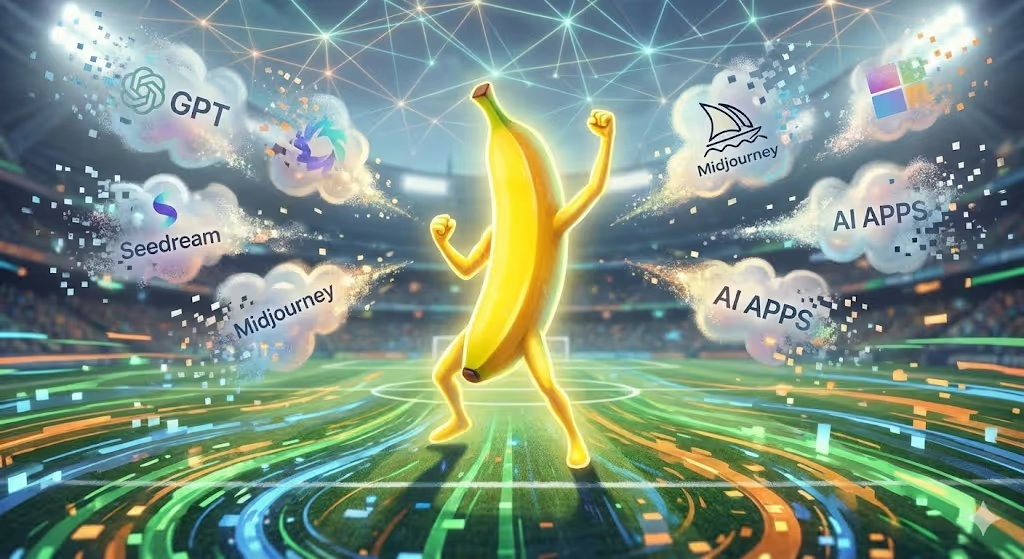
Imagine creating a photorealistic group photo of 14 people who were never in the same room together, or watching someone age from 25 to 80 in perfect detail—all with simple text prompts.
That's the reality with Nano Banana Pro, Google's advanced AI image generator that's transforming how creative professionals, marketers, and content creators approach visual production. Nano Banana Pro is here — all the new features in Google's latest AI image generator.
By the end of this guide, you'll understand exactly how to leverage Nano Banana Pro's capabilities, from mastering the seven official Google tips to accessing it completely free. You'll learn the workflows that professionals use daily and discover how to integrate this powerful tool into your creative process.
What Makes Nano Banana Pro Different
Nano Banana Pro isn't just another AI image generator—it's a comprehensive visual creation system that solves real problems other tools can't touch.
Ultra-Realistic Detail
The model delivers native 4K resolution output, creating images so detailed they're suitable for print, broadcast, and large-format displays. Unlike competitors limited to 1024x1024 pixels, Nano Banana Pro produces crisp, professional-grade visuals at scale.
Group Photo Mastery
Upload up to 14 reference images and watch as the AI seamlessly combines them into coherent group compositions. Upload images while maintaining each person's unique facial features and characteristics—perfect for virtual team photos or family portraits.
Perfect Text Rendering
Finally, an AI that actually spells correctly. Nano Banana Pro renders legible text in multiple languages, making it invaluable for creating mockups, infographics, and branded content without post-processing.
Character Consistency
The model maintains the same person's appearance across different scenes, poses, and environments. Create entire visual narratives with recognizable characters that stay consistent throughout your campaign.
Real-Time Knowledge
Nano Banana can be connected to Google Search, allowing you to snap a recipe, live weather report or sports score and use these to inform an image generation. This grounding in real-world data ensures accurate, up-to-date visual content.
Comparison Chart: Nano Banana Pro vs. Competitors
| Feature | Nano Banana Pro | Midjourney | ChatGPT | DomoAI |
|---|---|---|---|---|
| Max Resolution | 4K Native | 1024x1024 | 1024x1024 | 4K (upscaling) |
| Text Rendering | Excellent | Poor | Good | N/A |
| Multi-Image Input | 14 images | None | None | Video frames |
| Character Consistency | 5 people | Limited | Limited | Motion tracking |
| Free Access | Yes (limited) | No | Limited | Free tier |
| Best For | Still images, mockups | Artistic style | Conversational | Video animation |
Getting Started: Free Access Methods
Method 1: DomoAI (Full Creative Workflow)
DomoAI now includes Nano Banana Pro as part of its all-in-one creative suite. Generate images and turn them into videos without switching platforms.
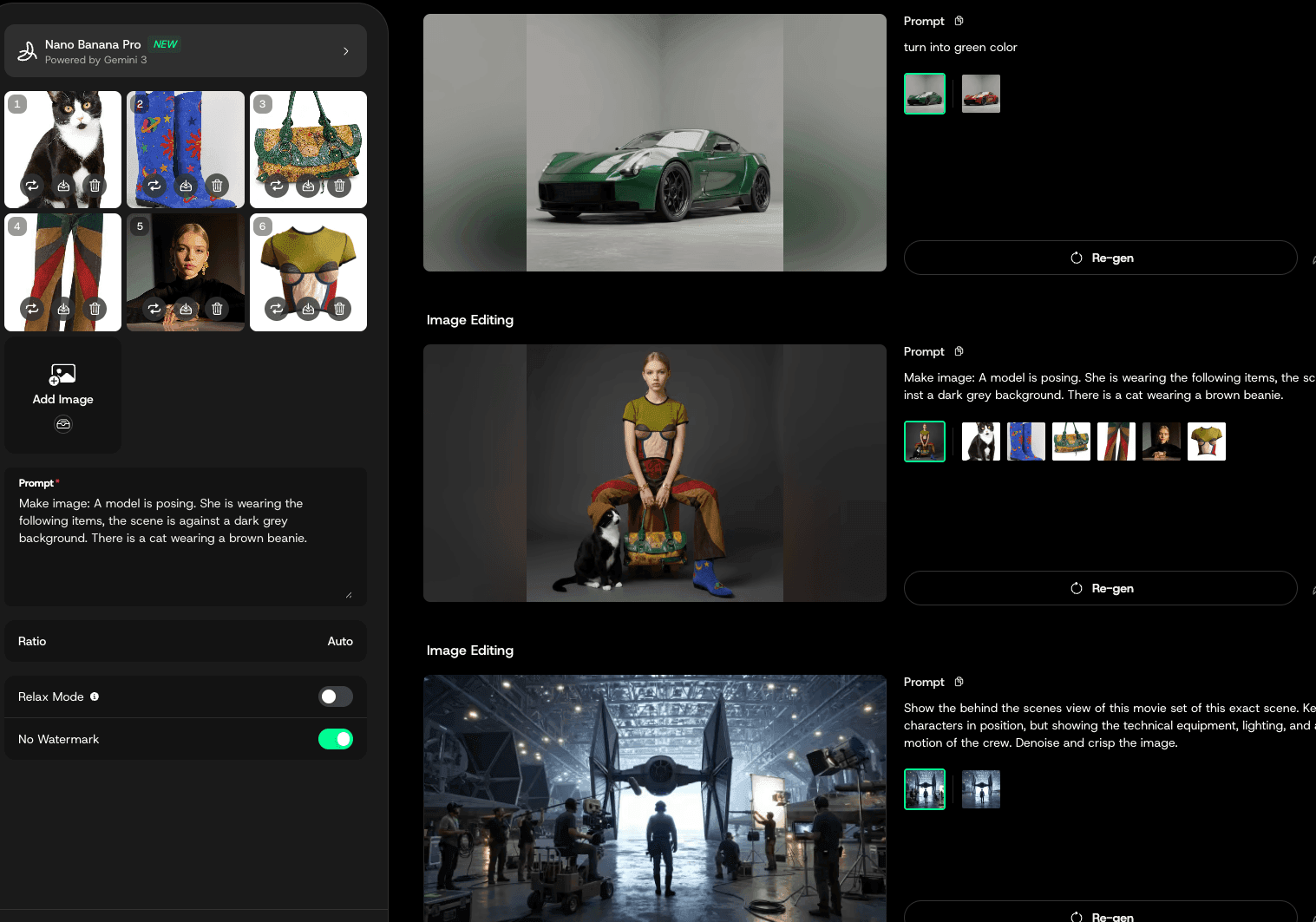
- Visit DomoAI Nano Banana Pro
- Edit your image with text prompts or references
- Save image to your asset
- Animate directly using Image to Video, Talking Avatar, Frames to Video, or viral templates
- Upscale to 4K and export
Why choose this method: DomoAI connects image generation to video creation in one workspace. Generate your source image, then immediately animate it—no downloads or uploads required.
Method 2: Official Gemini App (50-100 Free Generations)
- Visit gemini.google.com or download the Gemini mobile app
- Select "Thinking" mode to activate Nano Banana Pro
- Choose image generation from the menu
- Enter your prompt and generate
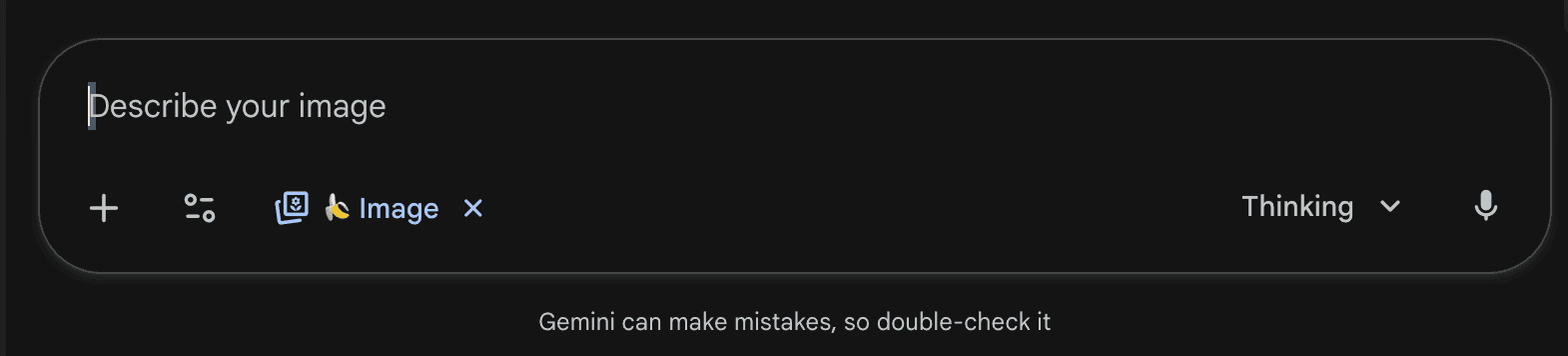
The free tier provides approximately 50-100 Pro generations before falling back to the standard model. Mobile users often report higher quotas than desktop users.
Method 3: Google AI Studio for Developers
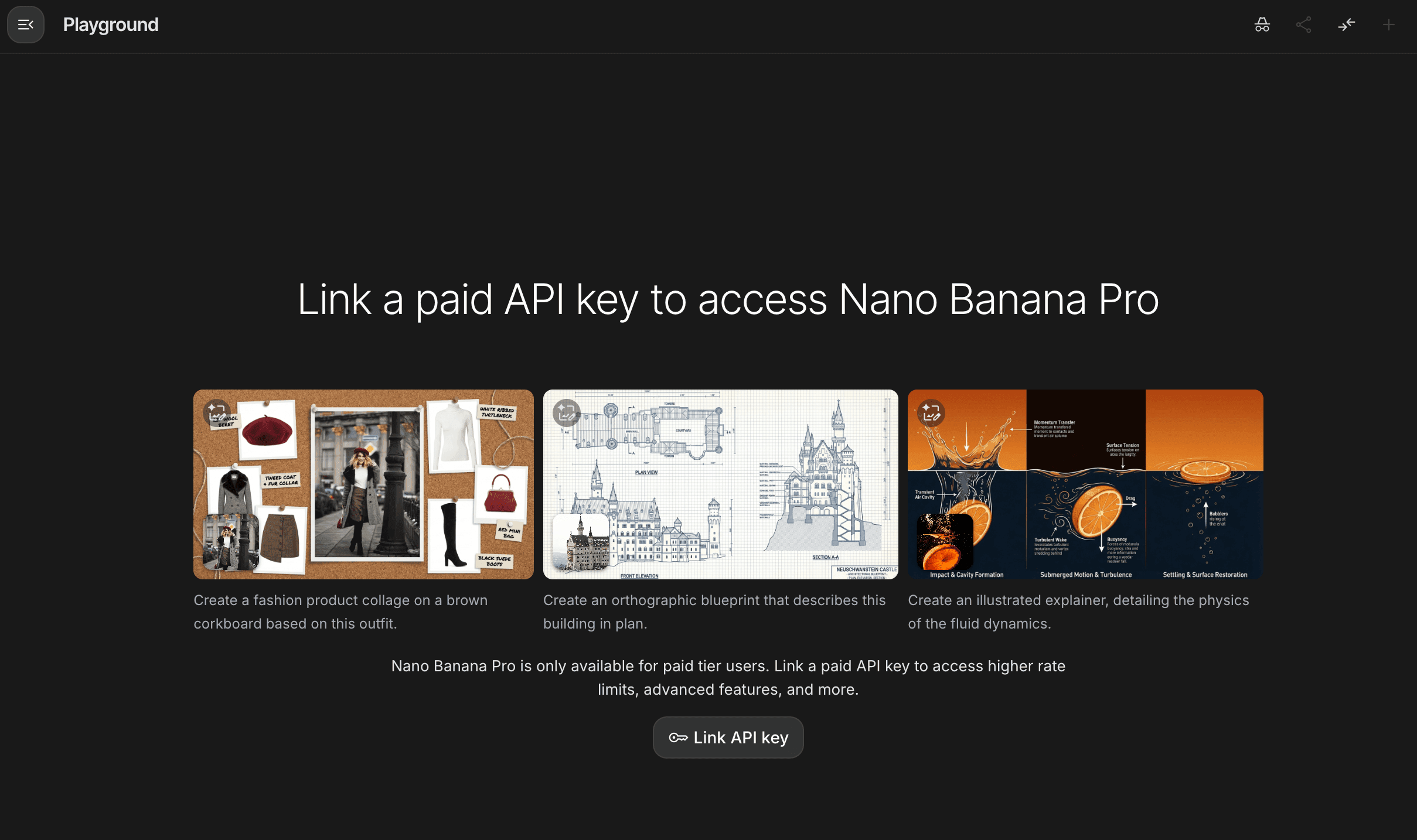
Access through aistudio.google.com:
- Log in with Google account
- Select "Nano Banana Pro" from model picker
- Test prompts in playground interface
- Copy production-ready code in multiple languages
Method 4: DomoAI Integration Options
While Nano Banana Pro excels at still image generation, you can extend its capabilities by combining it with DomoAI's Image to Video feature with styles like Japanese anime or realistic animation. Generate 4–15 second clips, depending on the selected Image to Video model.
The 7 Official Google Tips for Success
Official Nano-Banana Prompting Guide and strategies for Mastering Gemini 3 Pro Image generation and editing with Nano Banana Pro.
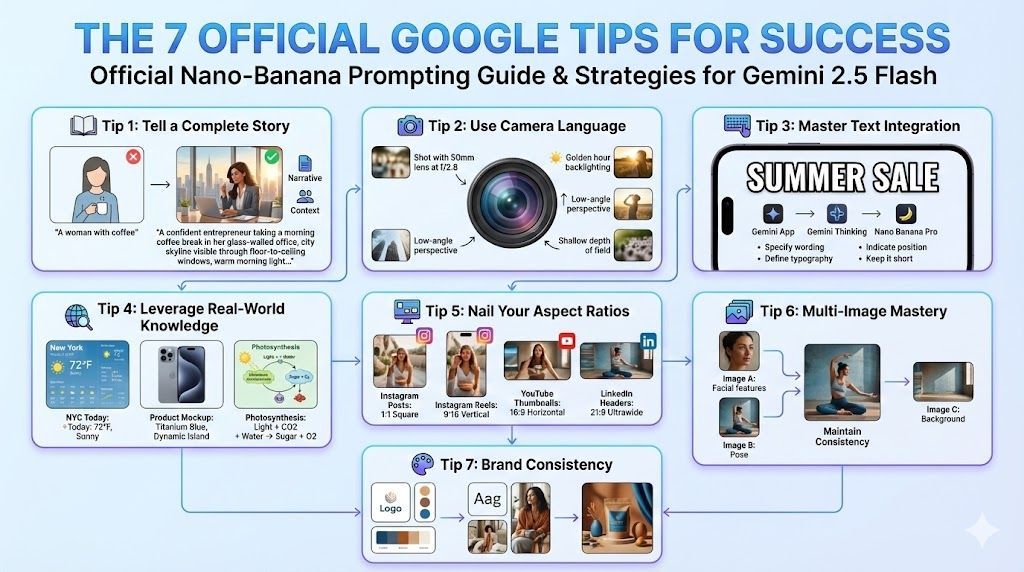
Tip 1: Tell a Complete Story
Don't just describe objects—create narratives.
Instead of: "A woman with coffee"
Try: "A confident entrepreneur taking a morning coffee break in her glass-walled office, city skyline visible through floor-to-ceiling windows, warm morning light creating subtle shadows on her face, wearing a navy blazer"
This narrative approach gives the AI context to make intelligent decisions about lighting, expression, and composition.
Tip 2: Use Camera Language
Treat Nano Banana Pro like a professional photographer.
Effective camera terms:
- "Shot with 50mm lens at f/2.8"
- "Golden hour backlighting"
- "Low-angle perspective"
- "Shallow depth of field"
These specifications translate directly into visual properties, creating more predictable, professional results.
Tip 3: Master Text Integration
How to use Nano Banana Pro · Open the Gemini app · Select Gemini Thinking · Choose Banana / Nano Banana Pro under image generation
For perfect text rendering:
- Specify exact wording: "The phrase 'SUMMER SALE' in bold"
- Define typography: "Sans-serif font, 72pt, white with black outline"
- Indicate position: "Centered at top of image"
- Keep it short: Maximum 3-5 words for best results
Tip 4: Leverage Real-World Knowledge
Nano Banana Pro's Google Search integration enables factually accurate visuals.
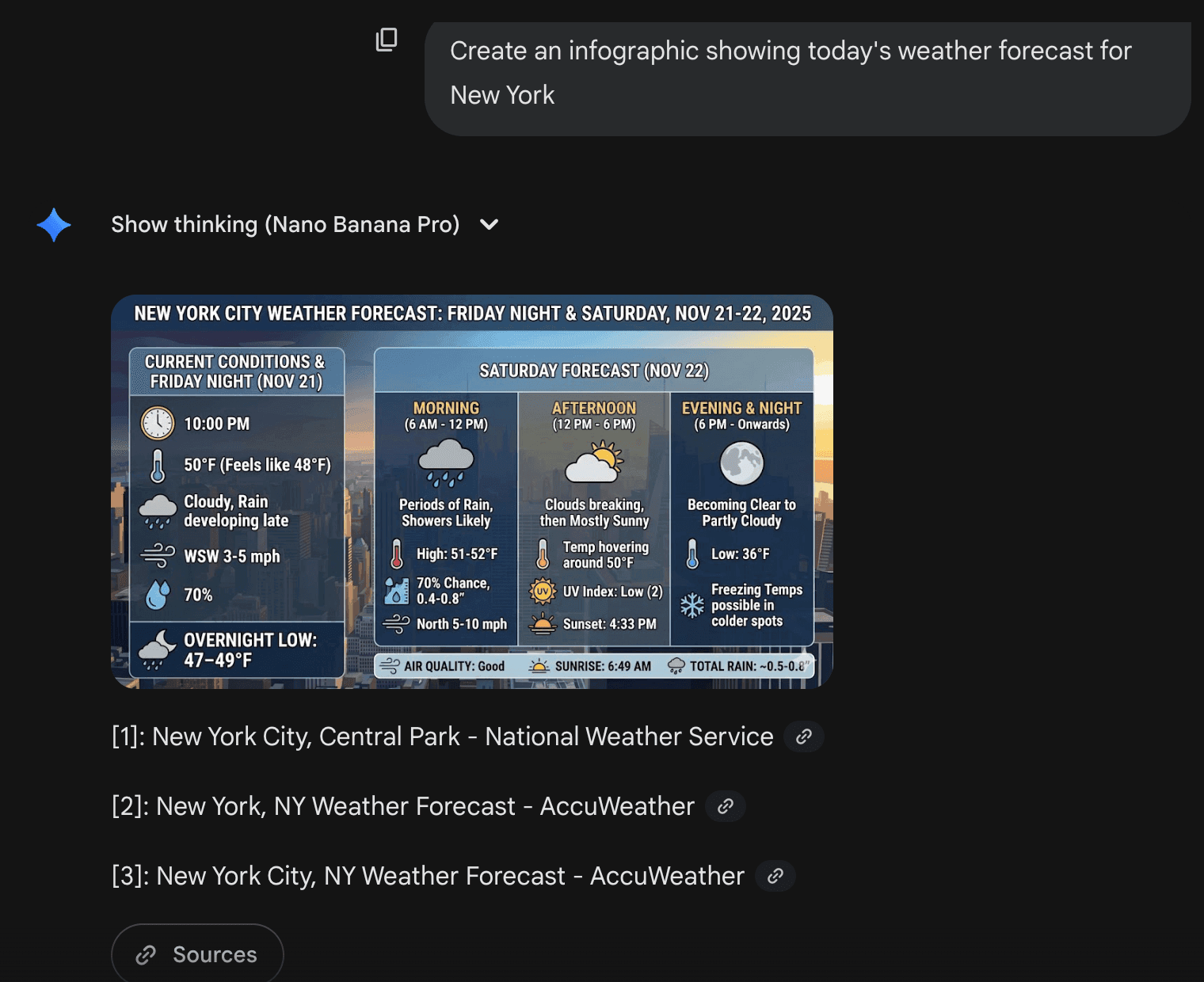
Example prompts:
- "Create an infographic showing today's weather forecast for New York"
- "Generate a product mockup with the current iPhone 15 Pro design"
- "Illustrate the photosynthesis process with scientifically accurate labels"
Tip 5: Nail Your Aspect Ratios
Different platforms need different dimensions:
- Instagram Posts: 1:1 square
- Instagram Reels: 9:16 vertical
- YouTube Thumbnails: 16:9 horizontal
- LinkedIn Headers: 21:9 ultrawide
Specify these directly in your prompt for platform-ready content.
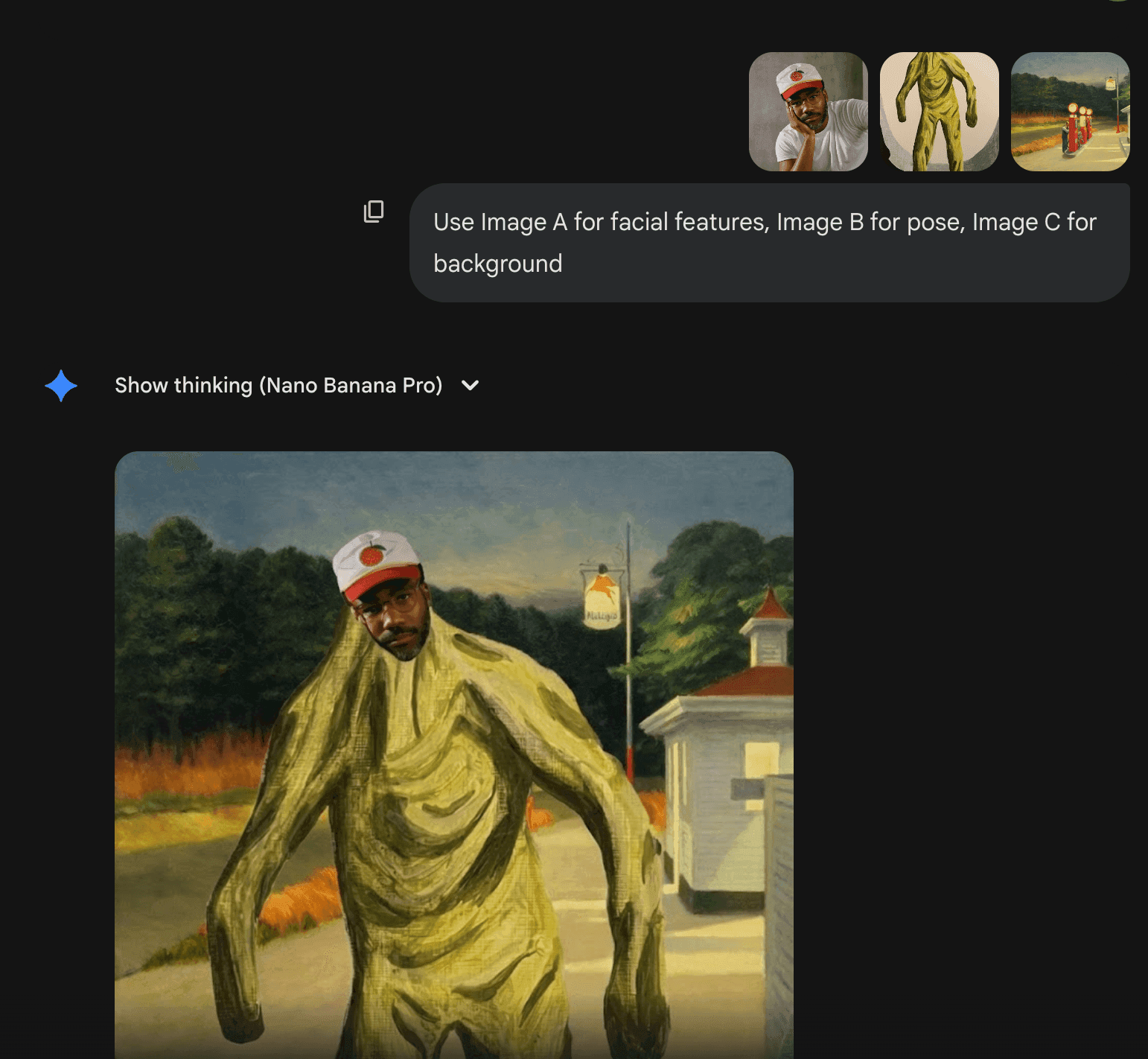
Tip 6: Multi-Image Mastery
When combining multiple images:
- Define each image's role: "Use Image A for facial features, Image B for pose, Image C for background"
- Maintain consistency: Keep similar lighting and perspective across inputs
- Start simple: Begin with 2-3 images before attempting all 14
Tip 7: Brand Consistency
Upload your brand guidelines as reference images:
- Logo files
- Color palette swatches
- Typography samples
- Previous campaign visuals
Then prompt: "Generate product lifestyle photo maintaining brand aesthetic from references, using warm earth tones with blue accents as shown"
Viral Use Cases You Can Try Today
Age Progression Photos
Transform a single portrait through the decades:
- Upload base photo
- Prompt: "Show this person at ages 30, 40, 50, 60, 70, and 80"
- Generate multiple variations
- Compile into "through the years" series
Pro tip: Maintain consistent lighting and background for believable progression.
View original post on Xhttps://x.com/minchoi/status/1991526532536496353
Celebrity Deepfakes (Use Responsibly)
While technically impressive, always consider ethical implications:
- Label as AI-generated
- Avoid misleading content
- Respect privacy and likeness rights
- Use for parody or educational purposes only
View original post on Xhttps://x.com/Ra1kshit/status/1991529421656977589?s=20
Product Mockups
A Step-by-Step Tutorial for guiding beginners to instantly create, blend, expand, and edit pictures using Google Nano Banana.
Create professional e-commerce imagery:
- Upload product photo on white background
- Upload lifestyle setting reference
- Prompt: "Place product naturally in scene with realistic shadows and reflections"
- Generate variations for A/B testing
View original post on Xhttps://x.com/kamil_sattar/status/1991866913450836245?s=20
Meme Creation
Leverage text rendering for viral content:
- Classic meme formats with custom text
- Brand-specific meme templates
- Multi-panel comic strips
- Reaction images with captions
View original post on Xhttps://x.com/osanseviero/status/1991554530992091278?s=20
View original post on Xhttps://x.com/cto_junior/status/1991561926363738412?s=20
Sketch to Reality
Transform rough drawings into photorealistic images:
- Upload hand-drawn sketch
- Add style reference image
- Prompt: "Convert sketch to photorealistic rendering maintaining composition"
- Refine with additional prompts
View original post on Xhttps://x.com/Preda2005/status/1964487789589999682
Comic Book Style
Create consistent character sheets:
- Upload character reference
- Generate multiple angles: "Show character from front, side, back, and three-quarter view"
- Apply consistent style: "Render in Marvel Comics style with bold outlines"
View original post on Xhttps://x.com/ammaar/status/1991640356790890961?s=20
DomoAI Alternative: For animated comics, generate your still frames in Nano Banana Pro, then use DomoAI's Character Animation feature to create 5-30 second animated sequences in Japanese anime or cartoon styles.
Professional Workflow Integration
Brand Asset Creation
Marketing teams use Nano Banana Pro to generate campaign materials at scale:
- Upload brand guidelines (logos, colors, fonts)
- Create template prompts for consistency
- Batch generate variations
- Review and select best options
- Refine with targeted edits
This workflow reduces asset creation time by 60-70% while maintaining brand consistency.
E-commerce Product Photography
Replace expensive photo shoots:
- Generate lifestyle shots from product cutouts
- Create seasonal variations without reshoots
- Test different demographics and settings
- Produce size and color variations instantly
Educational Content Creation
Teachers and course creators leverage the tool for:
- Scientific diagrams with accurate labels
- Historical scene recreations
- Mathematical concept visualizations
- Multi-language educational materials
Real Estate Visualization
Show properties' potential:
- Virtual staging of empty rooms
- Seasonal exterior variations
- Renovation previews
- Neighborhood context shots
DomoAI Video Workflows
Combine Nano Banana Pro with DomoAI for complete visual production:
- Generate high-quality stills in Nano Banana Pro
- Import to DomoAI's Image to Video feature
- Apply animation styles (anime, realistic, pixel art)
- Add voice-over with DomoAI's Talking Avatar
- Upscale final output to 4K using DomoAI's Video Upscaling
Advanced Techniques & Pro Tips
Anatomically Structured Prompts
Professional prompt structure:
[ACTION] + [SUBJECT] + [SETTING] + [TECHNICAL] + [STYLE] + [QUALITY]
Example: "Create [ACTION] a lifestyle photograph of a woman in her 40s wearing navy blazer [SUBJECT] in modern office with city view [SETTING] shot with 50mm f/2.8 lens [TECHNICAL] editorial corporate style [STYLE] photorealistic, sharp focus, high resolution [QUALITY]"
Reference Anchor Techniques
Use specific details to maintain consistency:
- Distinctive features: "Woman with left eyebrow scar"
- Unique elements: "Green birthmark on right cheek"
- Character tokens: "Character-Maya-blue-jacket"
Include these anchors in every prompt featuring that character.
Multi-Step Refinement
Never expect perfection in one generation:
- Generate base image
- Identify what needs adjustment
- Send targeted refinement: "Keep everything but increase shadow contrast"
- Fine-tune specific elements
- Export final result
Common Pitfalls to Avoid
- Don't mix conflicting styles: "Realistic oil painting in flat vector style" confuses the AI
- Avoid over-specification: Balance technical details with creative direction
- Keep text short: Maximum 3-5 words for reliable rendering
- Don't regenerate completely: Build on successful outputs with refinements
Limitations & Realistic Expectations
Text Rendering Edge Cases
While improved, text can still struggle with:
- Unfamiliar words or names
- Long passages (keep under 5 words)
- Curved or stylized text
- Multiple text elements
Solution: Generate without text, add in Photoshop for critical applications.
Character Consistency Limitations
Consistency degrades with:
- Extreme pose changes
- Multiple editing rounds (5+)
- Mixing realistic and stylized elements
- More than 5 people simultaneously
Complex Scene Challenges
The model may struggle with:
- Intricate spatial relationships
- Very small background details
- Excessive visual complexity
- Fine patterns or textures
Solution: Generate components separately, composite in post-production.
Knowledge Cutoff Issues
Real-time data has limits:
- Very recent events may not reflect
- Rapidly changing information needs verification
- New product releases might not render accurately
Always verify current information for time-sensitive content.
Cost Considerations
Heavy usage requires planning:
- Free tier: 50-100 generations
- Pro tier: $20/month for higher quotas
- API pricing: ~$0.15 per 4K image
- Consider batch processing for efficiency
Future Outlook & Recommendations
Integration Trends
Nano Banana Pro is rapidly integrating across Google's ecosystem and professional tools:
- Direct integration in Adobe Creative Suite
- Native support in Canva and Figma
- Embedded in Google Workspace
- API access for custom applications
Emerging Professional Applications
New use cases continue developing:
- Game asset generation
- Film pre-visualization
- Architectural rendering
- Medical illustration
- Fashion design iteration
Strategic Implementation
For individuals:
- Start with free tier to learn
- Master the 7 official tips
- Develop personal prompt templates
- Upgrade when hitting quota limits
For organizations:
- Pilot with specific departments
- Establish brand guidelines
- Create approval workflows
- Scale gradually with proven ROI
When to Choose Nano Banana Pro vs. Alternatives
Choose Nano Banana Pro for:
- High-quality still images
- Text-heavy designs
- Multi-reference consistency
- Professional mockups
- Educational content
Choose DomoAI for:
- Video generation from stills
- Animation and motion
- Style transformation of videos
- Character animation
- Talking avatars
The tools complement each other perfectly—use Nano Banana Pro for source imagery, DomoAI for motion and animation.
FAQ Section
Q: Is Nano Banana Pro really free to use? A: Yes, with limitations. You get 50-100 free generations through the Gemini app, then it falls back to the standard model. Third-party platforms like felo.ai offer extended free access.
Q: How does it compare to DomoAI? A: Nano Banana Pro excels at still image generation with incredible detail and text rendering, while DomoAI specializes in AI video generation and animation. They complement each other perfectly—use Nano Banana Pro for high-quality still images, then DomoAI to bring them to life in videos.
Q: Can I use generated images commercially? A: Yes, Google's terms allow commercial use of generated content, but always review current terms of service and consider ethical implications.
Q: What's the best way to learn prompt engineering? A: Start with the 7 official Google tips, practice with simple prompts, and gradually add complexity. Study successful prompts from the community and iterate based on results.
Q: How do I maintain character consistency across multiple images? A: Use specific descriptive anchors, maintain similar framing, and create character tokens. Upload reference images and be specific about distinctive features you want preserved.
Q: What if my text comes out misspelled or unclear? A: Keep text short (3 words or less), specify exact fonts and styling, and consider adding text in post-processing tools like Photoshop for critical applications.
Q: Can I integrate this into my existing design workflow? A: Absolutely. Nano Banana Pro works well as an ideation and rapid iteration tool, with final refinement in professional design software. Adobe, Figma, and Canva are all adding direct integrations.
Q: What's the difference between the free and paid versions? A: Free versions have generation limits and may have slower processing. Paid tiers through Google AI Pro offer higher quotas, priority processing, and access to latest features.
Q: Is it suitable for professional client work? A: Yes, many agencies and professionals use it for rapid concept development, asset creation, and campaign ideation. Always review outputs for quality and brand compliance before client delivery.
Q: How can I combine Nano Banana Pro with other AI tools? A: Create base images in Nano Banana Pro, then use DomoAI for video generation, ChatGPT for copywriting, or specialized tools for specific refinements. The key is understanding each tool's strengths.
Conclusion
Nano Banana Pro represents a genuine breakthrough in AI image generation, offering capabilities that transform creative workflows from concept to completion. By mastering the seven official tips and understanding the tool's strengths and limitations, you'll accelerate your creative process while maintaining professional quality.
Start with the free tier through Gemini or third-party platforms. Practice the structured prompting techniques. Build your reference libraries. And when you need motion and animation, seamlessly transition your Nano Banana Pro creations into DomoAI's video creation ecosystem.
The future of creative production isn't about choosing one tool—it's about orchestrating the right combination for your specific needs. Nano Banana Pro has earned its place as an essential component in that toolkit.
Ready to start? Open gemini.google.com and try your first prompt today. For video animation of your creations, explore DomoAI's comprehensive suite.


