
Table of Content
Turn any text, image, or video into anime, realistic, or artistic videos. Over 30 unique styles available.
I'll never forget my first attempt at AI video generation. There I was, staring at a blank prompt field, typing "make a cool video of a sunset" and wondering why the result looked like a melting orange blob. Fast forward to today, and I'm creating cinematic-quality videos that actually match what's in my head—and I'm super excited to share everything I've learned along the way.
The AI video landscape in 2025 has exploded beyond what any of us imagined. With tools like Runway Gen-3, Pika Labs, DomoAI, and Google's Veo 3, we're not just making videos—we're painting with motion, sculpting with time, and telling stories that were impossible just months ago. But here's the thing: having powerful tools means nothing if you don't know how to communicate with them.
That's exactly what this guide is about. I'm going to walk you through my entire journey—the breakthroughs, the face-palm moments, and most importantly, the practical strategies that actually work. Whether you're a content creator looking to level up, a small business owner wanting to create marketing videos, or just someone curious about AI video, I've got you covered.
What you'll learn: My proven framework for writing prompts that work, platform-specific tricks I've discovered through hundreds of hours of testing, common mistakes that cost me time and credits (so you can avoid them), and real templates you can steal and use today. Let's dive in!
When I first started with AI video generation, I thought it would be like talking to a human video editor. Boy, was I wrong! AI models don't fill in the gaps like humans do—they need explicit, structured instructions about every single element you want to see.
The basic anatomy of an effective AI video prompt has four essential components that I've learned to think of as the "SASM Framework": Subject, Action, Style, and Mood. The subject is your main focus—who or what is the star of your video? This could be "a young woman with curly red hair wearing a vintage blue dress" or "a sleek silver sports car with racing stripes." The more specific you are here, the better your results.
Action is where the magic happens in video. Unlike static images, we need to describe movement and change over time. Instead of just "a person walking," I've learned to write things like "confidently striding forward with arms swinging naturally, hair flowing in the breeze." The key is using dynamic verbs and describing the quality of movement.
Style determines the visual treatment of your video. This is where you specify whether you want photorealistic footage, animated content, or something stylized. I've found that referencing specific visual styles works wonders: "in the style of Studio Ghibli animation" or "cinematic with shallow depth of field like a Christopher Nolan film."
Mood sets the emotional tone and atmosphere. Words like "mysterious," "uplifting," "melancholic," or "energetic" guide the AI in choosing appropriate lighting, color grading, and pacing. I always include mood descriptors because they tie everything together.
Here's what really opened my eyes: AI video models interpret prompts differently than text or image AI. They're processing temporal information, which means they need to understand not just what happens, but how it unfolds over time. When I write prompts now, I think cinematically—considering camera angles, movement, and scene progression.
My personal framework that I use for every single prompt follows this structure:
This framework has literally transformed my success rate from maybe 20% usable videos to about 80%. The difference is night and day!
After months of trial and error (and probably thousands of generated videos), I've developed ten rules that consistently deliver professional results. These aren't just theories—they're battle-tested strategies that work across multiple platforms.
Rule 1: Start with clear visual descriptions. I used to write vague prompts like "beautiful landscape." Now I write "rolling hills covered in purple lavender fields under a golden sunset sky with wispy cirrus clouds." The specificity makes all the difference. Every adjective should add meaningful information.
Rule 2: Specify camera angles and movements explicitly. Instead of hoping the AI figures it out, I tell it exactly what I want: "slow dolly zoom starting from wide establishing shot, gradually pushing in to medium close-up." Learning basic cinematography terms was a game-changer for me.
Rule 3: Include lighting and mood descriptors. Lighting sets the entire tone of your video. I always specify things like "soft morning light filtering through trees" or "dramatic rim lighting with deep shadows." This single addition improved my video quality by at least 50%.
Rule 4: Define the duration and pacing. Different platforms have different sweet spots. For DomoAI, I've found 5-10 seconds works best for complex animations, while their character animation feature shines at 3-5 seconds. Always match your prompt complexity to the duration.
Rule 5: Add style references that actually exist. When I discovered I could reference specific artistic styles, everything clicked. "In the style of DomoAI's Japanese anime mode" or "Pixar-quality 3 D animation" gives the AI a clear target. I keep a list of style references that consistently work well.
Rule 6: Use negative prompts effectively. This took me forever to figure out! Instead of saying what you don't want, describe what you DO want. Rather than "no blurry background," I write "sharp focus throughout the entire frame."
Rule 7: Layer prompts for complex scenes. When I need multiple things happening, I break it down: "Foreground: cat stretching lazily. Background: rain pattering against window. Overall: cozy indoor atmosphere." This layered approach prevents the AI from getting confused.
Rule 8: Test iterations systematically. I keep a prompt journal where I document what works and what doesn't. Small changes can have huge impacts. Changing "walking quickly" to "striding purposefully" completely transformed one of my character animations.
Rule 9: Consider aspect ratios early. Nothing's worse than creating the perfect video in the wrong format. I always specify "16:9 for YouTube" or "9:16 for Instagram Reels" right in my initial prompt. Platforms like DomoAI let you select this upfront, which saves so much time.
Rule 10: Save successful prompt templates. I have a Google Doc with my "greatest hits"—prompts that consistently deliver. When I need a talking head video, product showcase, or nature scene, I start with these proven templates and modify them.
Finding your unique visual style with AI video was my biggest challenge—and breakthrough. For months, I was creating generic-looking content that could have come from anyone. Then I discovered the secret: consistency through intentional style development.
I started by creating what I call a "style bible" for my brand. This includes specific color palettes (warm earth tones with pops of teal), mood descriptors (optimistic but grounded), and visual references (think Wes Anderson meets modern minimalism). Every prompt I write now incorporates elements from this style bible.
Creating consistent brand aesthetics requires more than just using the same words. I've learned to build a visual vocabulary that the AI understands. For example, when I want my signature look, I include: "warm golden hour lighting, slightly desaturated colors with enhanced earth tones, shallow depth of field with creamy bokeh, subtle film grain texture."
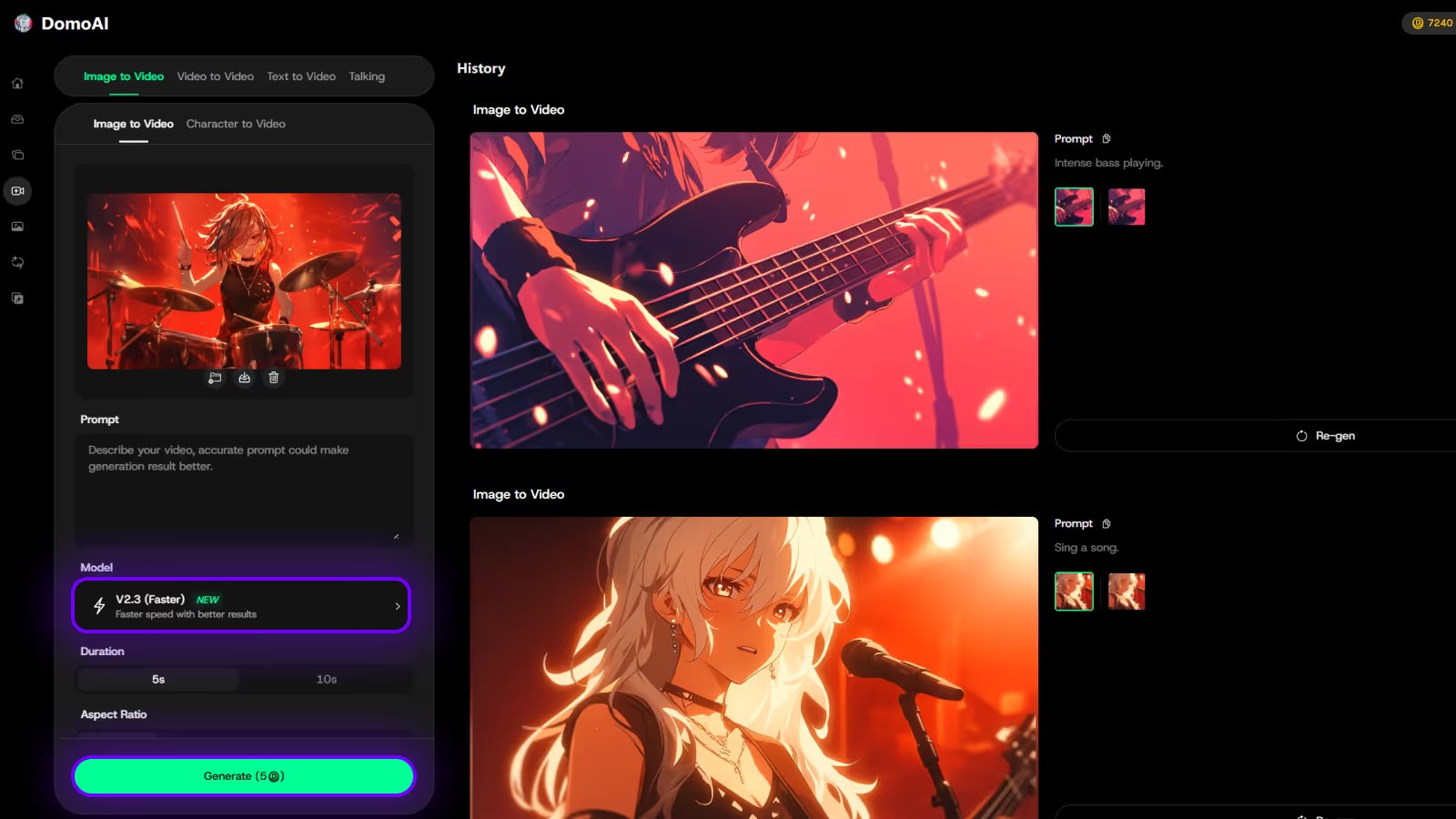
Using reference materials effectively changed everything for me. With tools like DomoAI's image-to-video feature, I can upload a reference image that captures my exact style, then animate it. I've created a folder of "style reference" images that perfectly represent my brand aesthetic—these become the foundation for maintaining consistency.
Color palette and mood specifications need to be precise but not overwhelming. I've found that three to four color descriptors work best: "dominated by warm browns and creams with accents of sage green." Too many colors confuse the AI; too few make videos look flat.
Genre-specific prompt strategies have become second nature. For corporate videos, I use: "professional, clean compositions with subtle camera movements, even lighting, modern office environment." For social media content: "dynamic, energetic cuts with vibrant colors and engaging motion." For cinematic pieces: "dramatic lighting with strong contrast, slow deliberate camera movements, epic scale."
My personal style development process took about three months of dedicated experimentation. I started by generating 5-10 videos daily with slight variations, noting what felt "right" and what didn't. Gradually, patterns emerged. I discovered I consistently loved soft, natural lighting with slight color grading toward the warm side, smooth camera movements rather than quick cuts, and a preference for realistic textures even in stylized content.
Let me save you from the mistakes that cost me hundreds of hours and probably thousands of credits. These are the pitfalls I wish someone had warned me about when I started.
Over-complicating prompts was my first major mistake. I'd write paragraph-long descriptions trying to control every pixel. Here's what I learned: AI works best with clear, structured instructions, not novels. My sweet spot is 3-4 sentences that hit all the key points without overwhelming the system.
Ignoring technical limitations cost me so much time. I kept trying to generate 60-second masterpieces when most platforms max out at 10-15 seconds of quality output. Now I design my concepts around these constraints rather than fighting them.
Not considering aspect ratios until the end was painful. I'd create this amazing 16:9 video, then realize I needed it vertical for TikTok. Cropping destroyed the composition. Now, aspect ratio is literally the first thing I specify.
Vague action descriptions plagued my early work. "Person moves across screen" gives the AI nothing to work with. Now I write: "Person walks from left to right with confident stride, arms swinging naturally, head turning to look at camera mid-walk." The difference is dramatic.
Forgetting about audio considerations seems obvious now, but I used to generate videos without thinking about sound. With platforms like DomoAI's Talking Avatar feature, I plan for audio from the start—considering lip sync, ambient sound, and music timing.
Poor sequence planning led to disjointed videos. I'd try to cram multiple scenes into one prompt. Now I break complex videos into individual shots, generate them separately, then edit them together. It takes more time upfront but saves hours of frustration.
Not testing on different models was limiting my potential. Each AI model has strengths. DomoAI excels at anime and stylized content, Runway handles realistic motion beautifully, and Pika is great for quick iterations. I now test my important projects across platforms to find the best fit.
After spending countless hours with every major AI video platform, I've developed strong opinions about when and how to use each one. Let me share what actually works in practice.
Runway Gen-3 has become my go-to for high-quality, realistic motion. The platform responds incredibly well to detailed cinematographic instructions. I've found that starting prompts with camera specifications—"35 mm lens, tracking shot"—produces consistently professional results. Runway's strength lies in its smooth, natural motion and excellent handling of complex scenes.
Pika Labs surprised me with its speed and efficiency. While it might not match Runway's absolute quality, it's perfect for rapid prototyping. I use Pika when I need to test multiple concepts quickly. The platform excels at simple, clear motions and responds well to straightforward prompts.
DomoAI has become indispensable for my stylized content needs. Their anime transformation capabilities are unmatched—I can take any video and transform it into stunning Japanese anime style. What really sets DomoAI apart is their comprehensive toolkit: I use their text-to-video for initial concepts, image-to-video for bringing stills to life, and their video-to-video feature for style transfers. The platform offers multiple models (V 2.4 Advanced for quality, V 2.4 Faster for quick iterations) which I choose based on project needs.
Stable Video works best for me when I need consistent character representation across multiple clips. The platform's understanding of spatial relationships is impressive. I've learned to leverage this by being very specific about positioning: "character stands in left third of frame, facing right."
Google's Veo 3 represents the cutting edge, especially with its integrated audio generation. I'm still exploring its capabilities, but initial results are promising for complete video packages with synchronized sound. The cinematic quality is remarkable, though access is still limited.
My prompt adaptation strategy for each platform:
Cost-effectiveness varies dramatically. DomoAI offers excellent value for stylized content creation. Runway is pricier but worth it for hero shots. Pika's lower cost makes it perfect for experimentation. I typically start with Pika for concepts, refine with DomoAI for style, and finish with Runway for final quality.
Storytelling through AI video generation requires a completely different approach than single-shot creation. I've developed techniques that help maintain narrative coherence across multiple generated clips.
Multi-scene story planning starts with a shot list, just like traditional filmmaking. I break my story into 5-10 second segments, each with its own prompt. For a recent project about a character's journey, I created: establishing shot (wide landscape), character introduction (medium shot), challenge revealed (close-up reaction), action sequence (dynamic camera), and resolution (pull back to wide). Each prompt built on the previous while maintaining consistent character description.
Character consistency across clips nearly drove me crazy until I developed my "character sheet" method. I write a detailed character description once, then copy it exactly into every prompt: "young woman, long black hair in ponytail, wearing red jacket over white t-shirt, determined expression." This base description stays identical while I only change actions and camera angles.
Emotional arc development through prompts has become one of my favorite techniques. I gradually shift mood descriptors across scenes: "cautiously optimistic" → "growing concern" → "desperate determination" → "triumphant relief." The AI picks up on these emotional cues and adjusts lighting, pacing, and color accordingly.
Transition and continuity techniques save projects in post-production. I've learned to end each clip with the subject in a specific position, then start the next clip from that same position. For example: "character exits frame right" followed by "character enters frame left." This creates natural cut points.
My favorite storytelling prompt templates:
The Hero's Journey Template:
Product Story Template:
Case studies from my own projects have taught me invaluable lessons. For a recent brand video, I generated 12 individual clips using consistent character descriptions and complementary color palettes. The final edit looked like it was shot by a single camera crew, not generated by AI across multiple sessions.
Technical optimization might sound boring, but these settings have literally doubled the quality of my outputs. Let me break down what actually matters.
Resolution and quality considerations depend on your final delivery platform. For Instagram, I generate at 1080 p—anything higher is wasted. For client presentations, I go maximum quality even if it takes longer. DomoAI's upscaling feature has been a lifesaver when I need to enhance resolution after generation.
Frame rate selection affects the entire feel of your video. 24 fps gives that cinematic look, 30 fps feels like traditional video, and 60 fps creates ultra-smooth motion. I match frame rate to content type: 24 fps for narrative content, 60 fps for product demos where smoothness matters.
Aspect ratio planning happens before I write a single word. My workflow: determine platform → set aspect ratio → write prompt accordingly. DomoAI's automatic aspect ratio options (1:1, 16:9, 9:16) save me from manual cropping. Pro tip: generate in 16:9 then crop to 9:16 gives more control than generating vertical directly.
File format optimization seems minor but matters for workflow. I always generate in the highest quality format available, then compress for specific uses. MP 4 for web, ProRes for editing, GIF for social media previews.
Workflow efficiency tips I've developed:
These templates have been refined through hundreds of iterations. Feel free to steal and adapt them!
Business/Corporate Video Templates:
The Executive Introduction:
"Professional medium shot, confident business person in modern office, subtle dolly in as they speak, soft key lighting with slight rim light, clean minimalist background with depth, corporate blue and gray color palette, 16:9 aspect ratio"
Product Showcase:
"Smooth 360-degree rotation around [product] on white cyclorama, soft studio lighting with no harsh shadows, slow consistent rotation speed, pristine and professional, 4 K quality"
Social Media Content Prompts:
The Hook Shot:
"Fast push in from wide to extreme close-up, vibrant colors with high contrast, energetic and dynamic, 3 seconds, 9:16 vertical format, eye-catching opening moment"
Story Time Format:
"Medium shot of engaging storyteller, animated hand gestures, warm authentic lighting, cozy background setting, natural movements, 9:16 format"
Creative/Artistic Video Prompts:
Dreamscape Sequence:
"Ethereal floating camera through surreal landscape, soft pastel colors blending like watercolors, slow-motion elements with particles floating in air, dreamlike atmosphere with lens flares, artistic film grain"
Artistic Portrait:
"Intimate close-up with shallow depth of field, subject emerging from shadows into soft window light, cinematic color grading with teal and orange, subtle camera drift, emotional and contemplative mood"
Product Showcase Templates:
The Reveal:
"Start in complete darkness, single spotlight gradually illuminates product from above, camera slowly pulls back revealing full product, dramatic and premium feel, black background with reflective surface"
Lifestyle Integration:
"Product naturally placed in authentic lifestyle setting, warm natural lighting, subtle focus pull from background to product, organic camera movement as if handheld, relatable and aspirational"
Explainer Video Frameworks:
Step-by-Step Process:
"Clean overhead shot of hands performing [action], well-lit workspace, smooth transitions between steps, clear and educational, consistent framing throughout sequence"
Brand Storytelling Examples:
The Origin Story:
"Nostalgic film look with slight grain, warm vintage color grading, slow push in on [founder/product], golden hour lighting through window, emotional and authentic, 16:9 cinematic format"
Every AI video creator faces these issues. Here's how I solve them quickly.
Common issues and solutions:
When videos come out blurry or low quality, I first check if my prompt is too complex for the duration. Simplifying to focus on one main action usually fixes this. If that doesn't work, I switch to a higher quality model—DomoAI's V 2.4 Advanced mode has saved many projects.
Style inconsistency between clips drove me crazy until I created my "style lock" technique. I generate all clips in one session, using identical style descriptors and even the same seed number when platforms allow it.
Weird morphing or unnatural movements usually mean the AI is confused by conflicting instructions. I strip the prompt down to basics, get that working, then gradually add complexity back.
Quality problems and fixes:
Low resolution outputs: Generate at maximum quality, then use DomoAI's upscaling feature. I've successfully upscaled 480 p generations to crisp 4 K.
Flickering or instability: Reduce camera movement complexity. Static shots or simple pans work better than complex crane movements.
Color inconsistency: Add specific color temperature values: "5600 K daylight" or "3200 K warm tungsten."
Technical troubleshooting:
Platform timeouts: Break complex prompts into smaller chunks. Generate elements separately then composite.
Credit waste on failed generations: Always test with lowest quality settings first. Only go high-quality once the prompt is refined.
When to iterate vs. Start over:
If the general concept is right but details are off: iterate with small adjustments.
If the fundamental interpretation is wrong: start fresh with restructured prompt.
If you've tried 5+ iterations without improvement: try a different platform or approach entirely.
Looking back at my journey from those first blob-like sunsets to creating professional-quality AI videos, I'm amazed at how far we've all come. The key takeaways from everything I've learned: specificity beats creativity in prompts, understanding each platform's strengths multiplies your capabilities, and systematic testing and documentation accelerates improvement faster than random experimentation.
What's coming in AI video technology has me incredibly excited. We're already seeing early tests of minute-long generations, real-time video creation, and integrated audio synthesis. Within the next year, I expect we'll be creating full short films entirely through prompts.
My encouragement for you: start experimenting today! Don't wait for the technology to be "perfect"—it's already incredibly powerful. Pick one platform (I recommend starting with DomoAI for its versatility), master its quirks, then expand from there. Create daily, document what works, and build your own prompt library.
Resources for continued learning: Join platform-specific Discord communities where creators share techniques. Follow AI artists on social media for inspiration. Most importantly, practice consistently—even 10 minutes daily will transform your skills within a month.
The future of video creation is here, and it's more accessible than ever. Whether you're creating content for business, art, or pure creative expression, AI video generation opens doors that didn't exist even six months ago. Your unique voice and vision, combined with these powerful tools, can create magic.
Remember: every expert was once a beginner staring at a blank prompt field. The only difference is they kept typing, kept learning, and kept creating. Your journey starts with your next prompt.
Ready to transform your ideas into stunning videos? Start creating AI-powered videos and animations with the tools and techniques you've learned here. The only limit is your imagination!
Recent articles