

MiniMax H3 and standard Kling VIDEO 3.0 differ most in how creators direct them. H3 combines text, images, video, and audio as free-form context. Kling offers clearer task-specific controls for shots, reusable subjects, voices, and motion.
Choose H3 for mixed-reference generation, source-video editing, direct 2K API output, or an open H3-Base deployment. Choose Kling for Custom Multi-Shot, reusable Elements, precise Motion Control, or a native 4K route.
This comparison covers standard Kling VIDEO 3.0. VIDEO 3.0 Omni uses a different input workflow and is not included.
Quick Answer
MiniMax H3 is the more flexible model. It treats text, images, video, and audio as one context package. That suits complex reference briefs and generative video edits.
Kling VIDEO 3.0 is the more guided model. Multi-Shot, Custom Multi-Shot, Elements, and Motion Control turn common production tasks into named controls.
Neither model has a universal raw-quality advantage. Kling has the higher documented resolution ceiling. H3 offers broader mixed-reference input and an open base-model route.
MiniMax H3 vs Kling VIDEO 3.0 At A Glance
| Difference | MiniMax H3 | Standard Kling VIDEO 3.0 |
|---|---|---|
| Main approach | Free-form multimodal context | Dedicated controls for specific production tasks |
| Text to video | Supported | Supported |
| Image to video | First frame, last frame, or both | Start-image workflow with optional Element binding |
| Reference inputs | Up to 9 images, 3 video clips, and 3 audio clips | Elements built from 2–4 images or a video; Motion Control uses an action video |
| Character consistency | Combines appearance, motion, style, voice, and scene references | Reusable Elements can bind appearance and voice tone |
| Motion transfer | Reference video can guide character motion, camera, style, or editing rhythm | Motion Control transfers action and expression to a target character |
| Multi-shot creation | Native multi-shot capability, directed mainly through prompts | Multi-Shot switch plus shot-by-shot Custom Multi-Shot control |
| Video editing | Generative source-video editing with multimodal instructions | Motion Control and Elements create new outputs; they are not general source-video editing tools |
| Native audio | 32 kHz stereo output and audio-reference input | Native Audio modes, voice-tone control, and multi-character dialogue support |
| Resolution | API: 768P or 2K; open H3-Base: 768p | 720p or 1080p modes, plus a route-dependent native 4K option |
| Duration | 4–15 seconds | 3–15 seconds |
| Access | MiniMax API and open H3-Base checkpoints | Kling web, app, and API routes |
| Best fit | Mixed references, source edits, API workflows, and self-hosted research | Explicit shot planning, reusable subjects, performance transfer, and 4K delivery |
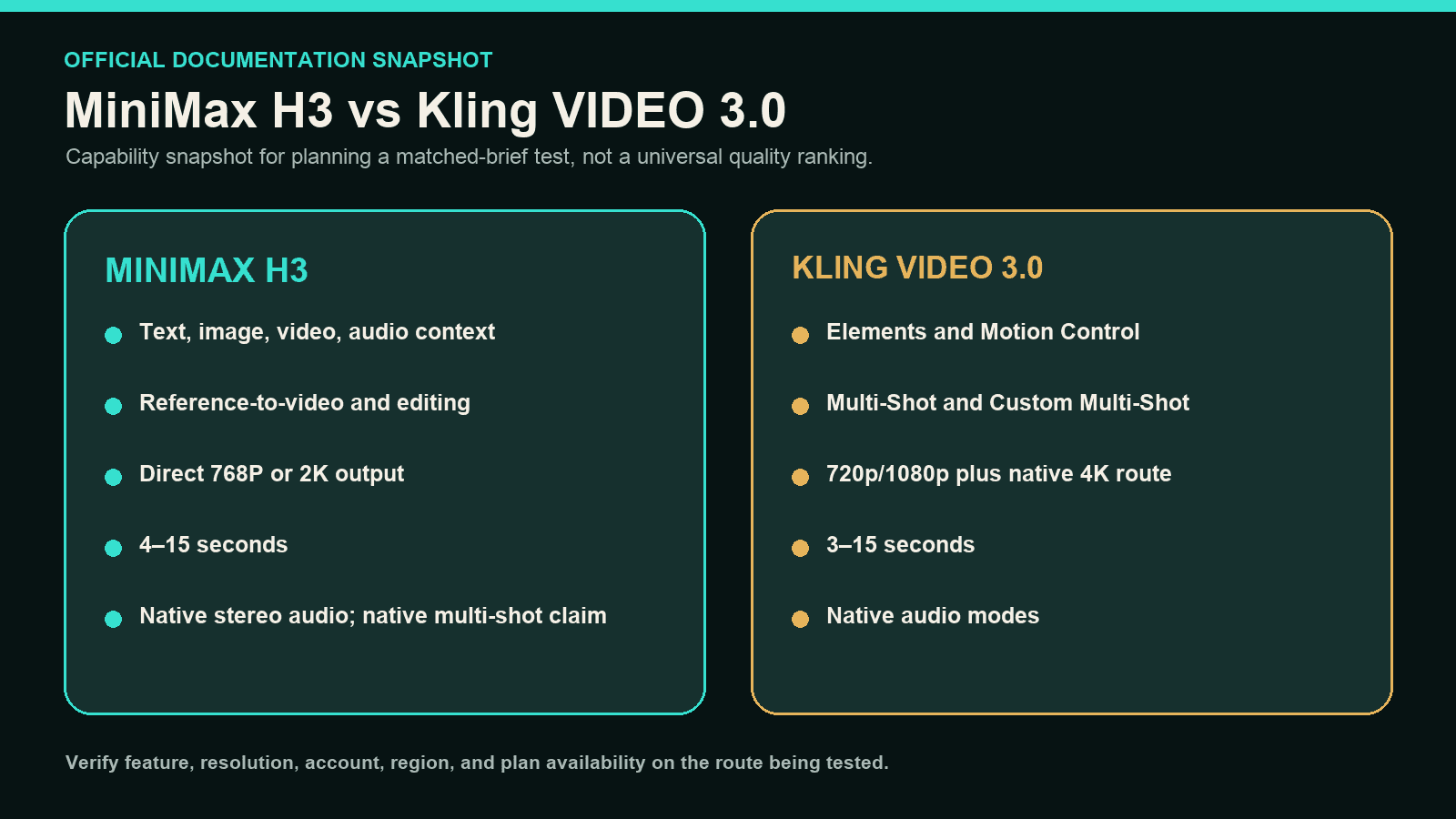
H3 favors free-form context. Kling exposes more named controls. Features and resolution can still vary by account, region, plan, interface, or API route.
The Biggest Difference Is How You Direct The Model
MiniMax's H3 launch notes describe one model that understands text, images, video, and audio together. Language assigns each reference a role inside the intended result.
The current H3 video documentation supports up to nine images. It also accepts three video clips and three audio clips in reference-led generation.
This design suits briefs with several connected constraints. One image can define identity, another can define clothing, and a video can define movement. Audio can guide voice, sound, or editing rhythm.
Kling organizes the same production space differently. It exposes Multi-Shot, Elements, Motion Control, and Native Audio as distinct controls. Creators choose the control that matches the job.
The practical difference is flexibility versus guidance. H3 accepts a broader context package. Kling makes several common tasks easier to configure through visible, named workflows.
Which Is Better For Image To Video?
H3 gives creators more ways to define the beginning and ending. It accepts a first frame, a last frame, or both. Its reference mode can also combine supporting images, video, and audio.
That makes H3 useful when one still image is only part of the brief. A creator can add appearance references, motion footage, a voice, or an editing rhythm.
Kling's standard image-to-video workflow starts from an image and can bind an Element. The Element helps keep a recurring subject recognizable while the framing or camera changes.
Choose H3 when mixed references or an exact ending frame matters. Choose Kling when a reusable subject and a guided image-to-video interface matter more.
Which Model Is Better For Character Consistency?
Neither model guarantees perfect identity across every shot. Their consistency systems solve different problems.
H3 can use several references in one generation. These can define face, outfit, style, movement, voice, and environment together. This flexibility helps when continuity depends on more than facial identity.
Kling Elements create a reusable subject from two to four images or a video. Character Elements can also bind a voice tone. This gives creators an explicit identity asset for later generations.
Kling Motion Control can add a facial Element to a target character. That facial reference does not cover clothing, hairstyle, makeup, or props. Those details still depend on the target image.
Choose Kling for a reusable character asset with a defined face and voice. Choose H3 when consistency must combine identity with several other reference types.
Multi-Shot, Motion Control, And Editing Are Not The Same Thing
Kling gives creators the clearer multi-shot interface. Multi-Shot lets the model plan a sequence. Custom Multi-Shot lets the creator define each shot and its duration.
H3 supports native multi-shot generation, but its current API does not expose equivalent shot-by-shot switches. Shot progression is directed through the prompt and multimodal context.
The difference changes for motion transfer. Kling Motion Control pairs a target character image with an action video. It aims to reproduce the action and expression on that character.
H3 treats a reference video as one part of a broader context. The video can guide motion, camera behavior, style, or editing rhythm alongside other references.
H3 also supports generative source-video editing. A creator can describe what should change and what should remain. Kling Motion Control creates a new character performance instead.
Choose Kling for explicit shot planning or a direct performance-transfer workflow. Choose H3 for mixed-reference direction or generative changes to an existing video.
Which Model Has Better Native Audio?
Both models generate video with audio, but they emphasize different controls.
H3 produces 32 kHz stereo audio. It also accepts audio references inside the same context as images and video. This suits soundtrack, voice, ambience, or timing-led briefs.
Kling separates Native Audio and No Native Audio modes. Its standard workflow supports voice-tone control, multi-character coreference, multiple languages, accents, and dialects.
Kling Elements can bind a character's voice tone for reuse. H3 instead lets audio function as another reference inside a broader multimodal instruction.
Choose H3 when audio must influence the whole context. Choose Kling when reusable voices or explicit dialogue controls are central to the scene.
Does Kling 4K Beat H3 2K?
Kling has the resolution advantage on routes that expose native 4K. Standard VIDEO 3.0 modes also support 720p and 1080p. Availability can differ across accounts and product routes.
The MiniMax API generates H3 output at 768P or 2K. Open H3-Base checkpoints generate 768p. MiniMax keeps its Context-IR and 2K regeneration services hosted.
H3's 2K regeneration reuses the original context and the 768P result. This differs from a conventional upscaler that only estimates missing detail.
Resolution does not settle motion quality, prompt following, or identity stability. Kling offers the higher ceiling. H3 offers a context-aware path to 2K.
H3 generates clips from 4 to 15 seconds. Standard Kling VIDEO 3.0 supports 3 to 15 seconds. Kling has a small advantage for three-second clips.
MiniMax H3 vs Kling 3.0 Price And Speed
The figures below were checked on August 12, 2026. MiniMax bills its API in US dollars. Kling's standard product guide lists credits, so the units are not directly comparable.
| Five-Second Output | Listed Generation Cost | Important Extra Cost |
|---|---|---|
| H3 at 768P | $0.40 | First five reference images are free; additional images and reference video can add charges |
| H3 at 2K | $0.65 | Reference video is billed by duration; additional images after the first five add charges |
| Kling 720p without native audio | 30 credits | Account, plan, or route can change the effective monetary cost |
| Kling 1080p without native audio | 40 credits | Account, plan, or route can change the effective monetary cost |
| Kling 720p with native audio | 45 credits | Voice-tone control adds 2 credits per second |
| Kling 1080p with native audio | 60 credits | Voice-tone control adds 2 credits per second |
H3 is easier to estimate in dollar terms. Kling may be easier to budget inside an existing credit plan. Neither table predicts cost per usable clip.
There is no stable official result showing that one model always generates faster. Queue load, duration, resolution, reference complexity, and access route all affect waiting time.
Where Can You Use H3 And Kling 3.0?
H3 offers both a managed API and open H3-Base checkpoints. The open release covers first/last-frame and reference-to-audio-video tasks. Context-IR and H3-Regenerate-2K remain hosted.
Kling provides managed web, app, and API routes.
MiniMax H3 is now available in DomoAI. Creators can generate with H3 through Omni Reference and keep their reference-led workflow in one DomoAI workspace.
What About Commercial Use?
Open weights do not mean unrestricted use. The MiniMax H3 Community License includes territory, attribution, safety, and commercial conditions. Products above $20 million in annual revenue need separate written authorization.
Kling's current terms say users own their Content under applicable law. They also restrict commercial use of Output without written permission.
Check the exact license, plan, API agreement, and intended use before client work or paid distribution. This article does not replace legal review.
MiniMax H3 And Kling 3.0 Strengths And Limits
| Model | Main Strengths | Main Limits |
|---|---|---|
| MiniMax H3 | Mixed image, video, and audio context; source-video editing; stereo audio; direct 2K API; open H3-Base checkpoints | No native 4K; fewer visible shot-planning controls; full Context-IR and 2K workflow is not completely open |
| Kling VIDEO 3.0 | Custom Multi-Shot; reusable Elements; Motion Control; native audio and voice controls; route-dependent native 4K | More task-specific workflow switching; features and credit costs vary by route; current commercial terms require careful review |
Which Model Should You Choose?
| Creator Or Job | Better Starting Choice | Why |
|---|---|---|
| Indie filmmaker planning several shots | Kling VIDEO 3.0 | Custom Multi-Shot and native 4K provide clearer sequence and delivery controls |
| Filmmaker editing an existing clip | MiniMax H3 | Source video can be revised with text and supporting image, video, or audio context |
| Anime or character creator | Depends on the asset strategy | Kling offers reusable Elements; H3 combines identity, outfit, motion, style, and voice references |
| Marketer building a reference-heavy product video | MiniMax H3 | Product images, motion footage, voice, and sound can share one context package |
| Creator reusing one spokesperson | Kling VIDEO 3.0 | An Element can bind the subject's appearance and voice tone |
| Social creator making short clips | Kling VIDEO 3.0 | The three-second minimum and guided controls fit compact outputs |
| Beginner using a direct product interface | Kling VIDEO 3.0 | Named controls make common tasks easier to identify |
| Developer or research team | MiniMax H3 | The API and open H3-Base checkpoints offer more deployment flexibility |
| Studio requiring native 4K | Kling VIDEO 3.0 | Kling has a native 4K route; H3 currently tops out at 2K |
The best choice follows the production job. H3 favors connected context and flexible editing. Kling favors visible controls, reusable assets, and higher-resolution delivery.
Frequently Asked Questions
Is MiniMax H3 Better Than Kling VIDEO 3.0?
Not for every workflow. H3 is better suited to mixed multimodal references, source-video editing, and open deployment. Kling is better suited to explicit Multi-Shot, reusable Elements, Motion Control, and native 4K routes.
Which Is Better For Image To Video, H3 Or Kling 3.0?
H3 fits image-to-video briefs that need first/last frames or mixed image, video, and audio references. Kling fits creators who want a reusable Element and a more guided interface.
Which Model Is Better For Character Consistency?
Kling offers the clearer reusable identity system through Elements. H3 offers broader reference composition for identity, outfit, style, motion, voice, and scene. Neither guarantees perfect consistency.
Is MiniMax H3 Cheaper Or Faster Than Kling 3.0?
The prices use different units, so there is no clean universal winner. MiniMax lists dollar-based API rates. Kling lists credits. Neither provider establishes a fixed cross-platform speed winner.
Can I Use H3 Or Kling 3.0 For Commercial Work?
Only after checking the applicable route and terms. H3-Base follows the MiniMax H3 Community License. Kling's current terms include additional restrictions on commercial use of Output without written permission.
Final Verdict
Choose MiniMax H3 when the project depends on mixed references, source-video editing, stereo audio, direct 2K API output, or open H3-Base deployment.
Choose Kling VIDEO 3.0 when the project depends on Custom Multi-Shot, reusable Elements, precise Motion Control, explicit voice workflows, or native 4K delivery.
Neither model wins every creative task. The deciding factor is whether the workflow needs H3's flexible context or Kling's dedicated controls.


