

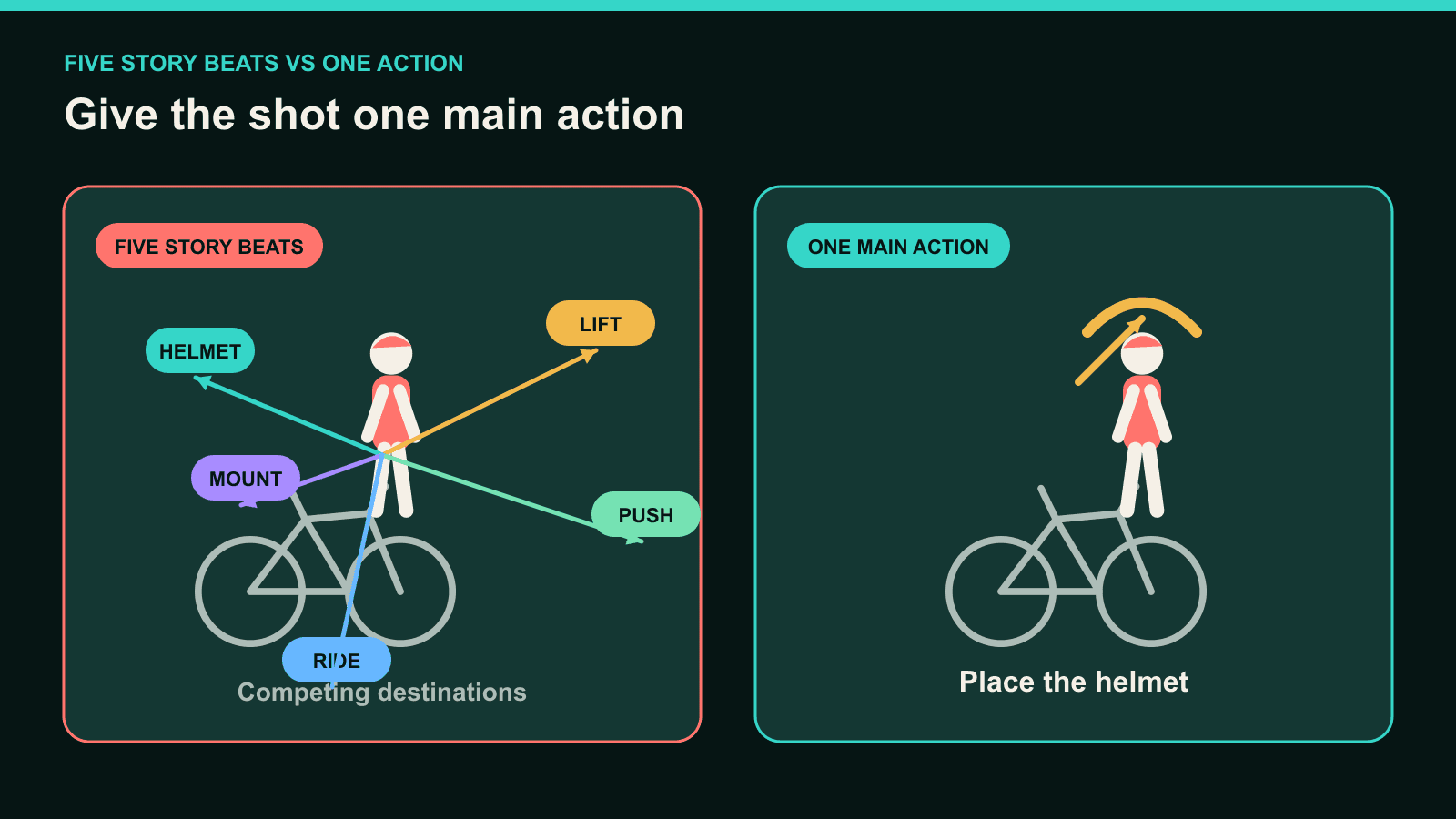
An image-to-video prompt works best when it gives the shot one clear main action. If you ask a short clip to show five separate changes, the model may combine, reorder, or leave some unfinished. Keep one event central, then treat hair, fabric, light, and camera motion as support.
This does not mean every prompt needs one verb. It means the viewer should be able to answer one question: what is the shot mainly showing?
Your Prompt Is Direction, Not a Shot Timeline
The source image already defines the subject, composition, lighting, and starting state. Your prompt should explain what changes after the first frame.
That is why “a woman in a café” adds little motion guidance. The image already shows the woman and café.
“The woman lifts the coffee cup to her lips” gives Image to Video a visible event to animate.
A prompt does not schedule every verb on an exact manual timeline. DomoAI uses the source image, prompt, selected model, duration, and settings to generate the clip.
The model may interpret a long action list as simultaneous motion. It may also finish the first action and run out of time for the rest.
Write the prompt around three ideas:
- Locked subject: the person, product, or object that must remain recognizable.
- One main action: the physical change the viewer should notice.
- Scene or camera support: movement that helps the action read without competing with it.
Use Start, Action, and End
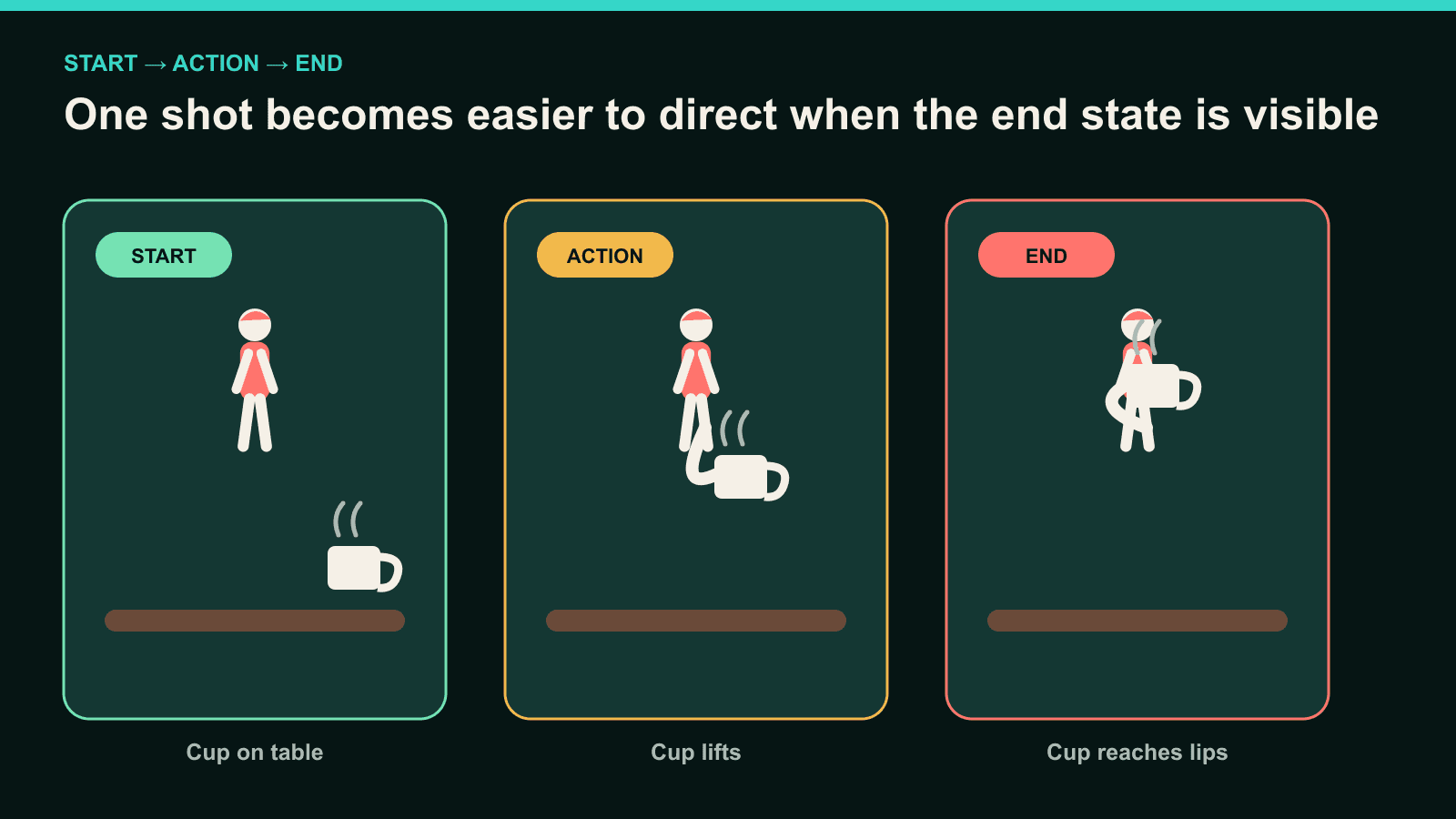
Before writing, describe the shot in three short lines:
- Start: What does the image already show?
- Action: What single physical event happens?
- End: What visible state completes that event?
For a coffee shot:
- Start: The cup rests on the table beside the woman's right hand.
- Action: She lifts the cup toward her mouth.
- End: The rim reaches her lips and she pauses.
The prompt becomes:
Locked medium shot. The woman reaches with her right hand, lifts the white coffee cup
from the table, and brings the rim to her lips. Her elbow bends in one continuous motion.
She pauses with the cup at her mouth. Steam curls upward and her loose hair moves slightly.
Warm window light from camera left. 5 seconds, 16:9. No camera shake, no extra cup, no hand
deformation, no text, no watermark.
“Reaches, lifts, and brings” are phases of one object interaction. The shot still has one main event: picking up the cup to drink.
Now compare that with a sequence of unrelated states:
The woman picks up the coffee, drinks it, stands up, walks to the window, turns around, smiles, and puts the cup down.
That prompt asks one short clip to stage an entire scene. Split it before adding more adjectives.
Character Movement: Bad Prompt to Better Prompt
Character prompts become clearer when you name one body change and its endpoint.
| Bad | Better | Why the revision helps |
|---|---|---|
The man walks, waves, turns, and sits down. | The man takes two slow steps toward the camera and stops with both feet visible. | One path and one readable ending replace four story beats. |
The dancer moves beautifully and dramatically. | The dancer raises both arms from shoulder height to overhead, then holds the final pose. | The model receives a visible joint path instead of an abstract mood. |
The girl looks around and runs away. | The girl turns her head from left to right while her body remains still. | The shot isolates the head turn. Running belongs in a later clip. |
Do not remove natural supporting motion. Hair can respond to a turn. Fabric can settle after an arm lift.
The support should reinforce the main action instead of becoming another story beat.
Product Movement: Bad Prompt to Better Prompt
Product prompts need a controlled object path. Avoid asking the item to rotate, open, transform, and reveal text at once.
| Bad | Better | Why the revision helps |
|---|---|---|
The bottle spins, opens, splashes, and turns into flowers. | The bottle rotates 90 degrees clockwise on the pedestal and stops with the front label facing camera. | The bottle follows one measurable path and ends in a defined orientation. |
Make the shoe look dynamic and premium. | The shoe tilts upward by 15 degrees as the camera remains locked at table height. | The prompt replaces brand language with visible movement. |
The box opens and everything flies out. | The box lid lifts on its rear hinge until it stands upright; the box stays fixed. | The lid moves while the product base remains locked. |
Add final prices, legal text, and exact product copy in an editor. Small generated typography may not remain exact during motion.
If the source product shape is already wrong, fix the still first. A motion prompt should not repair packaging geometry while animating it.
Camera Movement: Give It One Job
A camera move can support the subject or compete with it. Start with one camera intention per shot.
| Bad | Better | Why the revision helps |
|---|---|---|
Pan left, zoom in, orbit around her, then pull back. | Slow push-in from a medium shot to a close-up while the subject remains still. | One camera path creates a readable change in framing. |
Cinematic camera movement. | Locked waist-height camera tracks sideways at the cyclist's speed. | The direction, height, and relationship to the subject become explicit. |
The camera moves everywhere as the car speeds up. | Rear camera stays two feet behind the car at bumper height as the car accelerates. | The camera position remains tied to the main action. |
Use a locked camera when the subject action already has several moving parts. A quiet camera makes hand-to-object contact easier to read.
Use time segments only when the shot genuinely needs separate camera beats. Do not use timecodes to hide five unrelated subject actions inside one prompt.
Facial Action: Describe a Visible Change
“More emotion” does not tell the model which part of the face should move. Name a simple expression change and keep the head movement modest.
| Bad | Better | Why the revision helps |
|---|---|---|
She becomes emotional and expressive. | Her neutral expression changes into a small closed-mouth smile while she keeps eye contact with camera. | The expression has a clear starting and ending state. |
He looks surprised, laughs, and starts crying. | His eyebrows lift and his eyes widen as he turns toward the off-camera sound. | One reaction replaces three conflicting emotions. |
Natural face movement. | She blinks once, then tilts her chin down slightly without moving her shoulders. | The prompt names two connected micro-actions. |
Keep close-up prompts especially narrow. Small changes carry more visual weight when the face fills the frame.
Object Interaction: Name the Contact
Object interactions often break at the exact moment a hand touches, lifts, or releases the prop. Describe that contact in physical order.
| Bad | Better | Why the revision helps |
|---|---|---|
He uses the phone and puts it away. | His right hand closes around the phone, lifts it from the desk, and holds it at chest height. | The grip and path stay inside one interaction. |
She plays with the lantern, then lets it fly. | She opens both hands and releases the single glowing lantern above her head. | The prompt fixes the object count and release point. |
The rider gets ready and rides away. | The rider lifts the helmet with both hands and lowers it onto their head. | “Gets ready” becomes one visible action. Riding belongs in another shot. |
Use “single,” “one,” “right hand,” and “left hand” when object count or contact matters. Concrete nouns help more than extra mood adjectives.
Build One Complete Motion Prompt
Short does not mean vague. A useful prompt can stay focused while still naming physical motion, camera, light, duration, framing, and stability.
Helmet action — locked vertical shot
Paste this into Image to Video with a source frame showing the same rider beside the same bicycle:
Locked three-quarter camera at chest height, ten feet from the subject. The same young
adult cyclist in a mustard-yellow rain jacket, charcoal trousers, and white sneakers,
standing beside the same silver road bicycle and holding one matte-black helmet. The
cyclist lifts the helmet with both hands, lowers it onto their head, and releases the
helmet after it is seated. The chin strap swings once and settles. The bicycle remains
stationary. Early morning, soft amber light from camera left. 5 seconds, 9:16. No camera
shake, no subject drift, no bicycle movement, no extra helmet, no hand deformation, no
text, no watermark.
The subject clause locks the rider and props. The main action is putting on the helmet. The strap movement supports that event.
The bicycle remains still because its motion would start a second story beat.
Revise One Cause at a Time
When a result misses the intention, diagnose the visible failure before rewriting everything.
| What you see | First revision |
|---|---|
| The main action never starts | Replace an abstract verb with a physical movement. |
| The action begins but never finishes | Shorten the path or give it more duration. |
| Two actions run together | Keep the more important action and move the other to another shot. |
| Camera motion hides the action | Lock the camera or reduce it to one simple move. |
| A prop duplicates | State the count and keep the prop description unchanged. |
| The source contains a broken hand or object | Repair the image before regenerating the video. |
Keep the parts that already work. If the action is clear but the camera moves too much, edit the camera line only.
AI Optimize can expand a short prompt where the selected DomoAI tool supports it. Treat the result as a draft, then remove actions or details that compete with your main event.
For broader structure and camera language, use DomoAI's AI video prompt guide.
When One Image Is Not Enough
Use another shot when the story needs a new action, location, camera position, or subject state. Put on the helmet in one clip. Lift the bicycle in the next. Ride away in the third.
Do not turn one image-to-video prompt into a hidden storyboard.
If one continuous move must pass through known visual states, use Frames to Video. That workflow owns the start, intermediate, and end images.
Keep the handoff short: one image asks the model to invent the destination. Multiple frames tell it which moments the video must reach.
Image-to-Video Prompt Questions
Why does AI video ignore part of my prompt?
The clip may not have enough time or a clear priority for every requested action. Keep one main event and move later story beats into later shots.
Can an Image to Video prompt include more than one action?
Yes, when the smaller motions support one readable event. Lifting a cup and bending the elbow belong together. Standing, walking, and sitting are separate beats.
Does a shorter prompt always make a better video?
No. A short prompt can still be vague, and a focused prompt can be detailed. Clarity comes from one main action, physical direction, and a visible endpoint.
Why can the same prompt create different results?
Generation varies between runs. Keep your source and settings stable when revising so you can judge the one change you made.
Should I change the model or rewrite the prompt first?
Check whether the selected model supports the duration and control you need. If it does, revise the visible action before changing several settings at once.
One clear action is not a secret formula. It is a way to make the shot easier to direct, review, and revise.
Open Image to Video and write the first motion as a physical change.


