Table of Content

Try DomoAI, the Best AI Animation Generator
Turn any text, image, or video into anime, realistic, or artistic videos. Over 30 unique styles available.
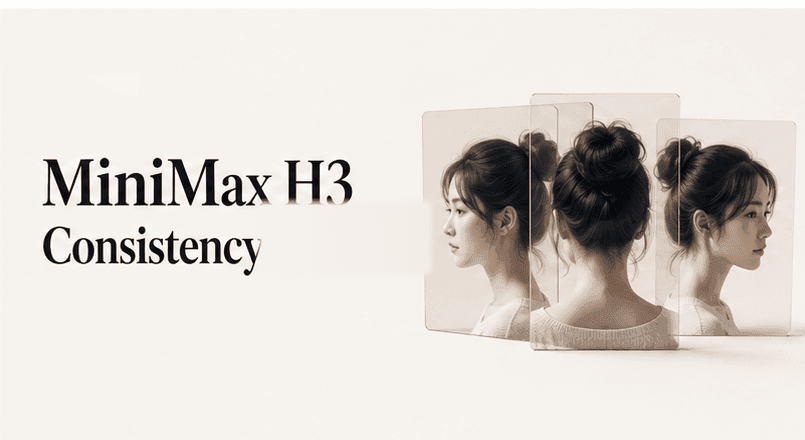
Character consistency in MiniMax H3 starts before video generation. Build a clean reference pack, lock the character description, and change only one shot variable at a time. This method can reduce face, outfit, and style drift across recurring character shots.
Character consistency means that viewers can recognize the same subject across every shot. A matching hairstyle alone does not meet that standard.
A consistent character keeps the same core identity:
Camera angle, expression, pose, and lighting may change. The character's identifying features should not.
MiniMax H3 accepts text, image, video, and audio inputs. Its official materials describe a Reference Generation workflow built around reference images and videos, with optional audio references used alongside visual media.
H3-Context-IR serves a different purpose. It interprets multimodal inputs and returns an enhanced prompt; it does not generate the video. References can guide continuity, but MiniMax does not guarantee perfect identity across every shot.
A single portrait leaves many details undefined. It shows one angle, one expression, and only part of the outfit. The model must infer everything outside that frame.
Create a compact reference pack before generating a sequence:
Use the same design in every image. A reference pack with conflicting hair lengths or jacket details creates ambiguity instead of control.
If the pack needs repair, the Multi-Model Image Generator & Editor includes GPT Image 2, Nano Banana 2, and Nano Banana Pro. Nano Banana Pro accepts up to nine reference images per session. It suits multi-reference character and style work.
You can also create the first character sheet with DomoAI Text to Image. For an anime card-style asset, Anime Card Maker offers another starting format.
Store the details that must survive every shot in one reusable block:
Character name:
Face:
Hair:
Eyes:
Outfit:
Body silhouette:
Color palette:
Signature prop:
Visual style:
Do not change:
Allowed changes per shot:
Make each field observable. “Distinctive hero” gives the model little guidance. “Teal bob with one gold streak, amber eyes, black cropped jacket with gold trim, ivory high-waisted pants, and a crescent pendant” defines visible constraints.
Create one identity clause and paste it into every shot prompt. Do not rewrite it for variety. Small wording changes can shift which features receive attention.
Keep the same character: an adult anime singer with a teal bob and one thin gold streak, amber eyes, a black cropped jacket with gold trim, ivory high-waisted pants, teal ankle boots, a crescent pendant, slim silhouette, soft cel-shaded anime style, and the same face proportions in every shot.
Place this clause before the changing action. Keep its order stable across the sequence.
For a mascot or product character, use the same structure:
Keep the same mascot: a small cobalt-blue fox with rounded ears, one white tail tip, a yellow messenger bag, three dark cheek marks, and the same flat graphic style in every shot.
The clause should identify the character. It should not describe the entire scene.
Treat each shot as a controlled variation. Keep the identity block fixed. Change the action, camera, or environment in a separate sentence.
Same character and outfit as the reference. Change only the action: she turns toward the camera, lifts the microphone, and takes one step forward under blue stage lights. Keep face shape, hair length, jacket, ivory high-waisted pants, crescent pendant, and color palette unchanged.
Use one meaningful action per short clip. A prompt that changes the pose, outfit, location, weather, lens, style, and emotion gives the model too many competing decisions.
A three-shot sequence might vary like this:
| Shot | Keep Locked | Change |
|---|---|---|
| Close-up | Identity, outfit, style, palette | Gaze shifts toward camera |
| Medium shot | Identity, outfit, prop, lighting family | Character raises microphone |
| Wide shot | Identity, outfit, stage design, palette | Character steps into spotlight |
This method also improves diagnosis. When the face drifts after one camera change, the new variable becomes easier to isolate.
Text describes a category. A reference shows exact visual relationships. Use reference media when wording cannot preserve a face, prop, costume pattern, or motion idea.
Use MiniMax-H3 Reference Generation when the shot needs visual references or an audio reference paired with visual media. The current workflow accepts up to nine images, three video clips, and three audio clips, with mixed reference input capped at 12 files. Each video or audio clip must be 2–15 seconds long. Referenced video and audio are each capped at 15 seconds in total. MiniMax's H3 reference documentation indicates that audio should accompany at least one image or video rather than serve as the sole reference input.
H3-Context-IR can structure complex multimodal input before generation. It runs asynchronously and returns an enhanced prompt rather than a video.
Choose references by purpose:
Do not add every available image by default. More references help only when they agree. Remove duplicates and contradictory variants.
Run a small continuity test before building a full scene. Use three shots that expose different risks.
Review the three clips side by side. Do not judge only the most attractive frame.
Use this drift checklist:
| Area | Pass Condition | Common Drift Signal |
|---|---|---|
| Face | Same proportions and age | Jaw, eyes, or nose shift |
| Hair | Same length and silhouette | Bangs, volume, or color changes |
| Outfit | Same cut and details | Sleeves, logos, or accessories disappear |
| Body | Stable height and build | Limbs or proportions change |
| Palette | Core colors remain fixed | Jacket or eye color shifts |
| Style | Same rendering language | Realism or line weight changes |
| Prop | Shape and placement remain readable | Prop changes size or hand |
If a detail fails twice, improve its reference or identity clause. Random retries rarely reveal the cause.
Different failures need different fixes.
| Problem | Likely Cause | Better Next Test |
|---|---|---|
| Face changes between angles | Weak profile reference or vague proportions | Add a three-quarter view and lock face shape |
| Hair grows or changes color | Hair description lacks length or silhouette | Define length, bangs, texture, and exact color |
| Outfit loses small details | Full-body reference lacks detail | Add an outfit crop and name the fixed elements |
| Character becomes more realistic | Style wording changes between prompts | Reuse one style clause without synonyms |
| Hands or props mutate | Action hides important geometry | Simplify the gesture and keep the prop visible |
| Background affects clothing color | Similar subject and background values | Increase contrast in the source image |
When several areas fail together, reduce the shot's ambition. Start with a stable composition, then add camera or body motion.
The same identity system applies across formats, but each audience has different failure risks.
Protect line weight, eye design, hair silhouette, outfit layers, and signature accessories. Test speaking close-ups separately from full-body action. A design may survive one scale and drift at another.
Lock facial proportions, apparent age, hairstyle, body build, and recurring wardrobe rules. Keep camera and lighting changes realistic. Extreme lens changes can alter the face even when the prompt repeats the same description.
Treat brand details as production constraints. Record exact colors, shapes, marks, and prop placement. Review the mascot beside the approved style guide, not from memory.
Build references for each planned lighting condition and camera distance. A night close-up and daylight wide shot create different continuity risks. Keep the identity clause stable while changing the lighting clause.
For every character type, approve a small shot pack before production. That pack becomes the visual baseline for later scenes and reviewers.
MiniMax H3 is coming soon to DomoAI. We’ll share the news once it’s live—stay tuned. You can use Seedance 2.5 in Omni Reference now.
Use Character to Video when a source performance should drive the new character. The workflow takes a source video and target character image. Subject Only mode can isolate the main subject.
Use Talking Avatar for dialogue or singing shots. It accepts an image or video plus audio and supports multilingual output. Keep the same approved portrait across speaking clips to protect identity.
These workflows solve different problems. MiniMax H3 generates a new performance from prompts and references. DomoAI Character to Video reuses existing movement. Talking Avatar connects a stable character asset to speech or vocals.
Use a clean reference pack, one locked identity clause, and prompts that change only one shot variable. Test short clips before generating a longer sequence.
Yes. MiniMax's official documentation lists Reference Generation with images and videos, plus optional audio references paired with visual media. H3-Context-IR is an optional prompt-enhancement step, not the generation task itself.
There is no universally best reference count. Start with the smallest consistent set that clearly defines the character. Add another reference only to resolve a missing angle, outfit detail, or motion requirement. Follow the technical limits in the reference section above when preparing the final input.
Add a clearer face reference, lock facial proportions, and reduce simultaneous camera or expression changes. Compare short tests from the same starting setup.
It can support reference-led character workflows, but suitability depends on the specific style and consistency target. Test facial proportions, line style, outfit details, and motion separately.
Use Character to Video when an existing performance should control the character's motion. Use H3 for a new shot built from prompts and reference media.
A consistent sequence comes from stable inputs, not longer prompts. Save the approved reference pack, identity clause, and QC sheet as one production baseline. Expand beyond the initial test only after the same character passes at close, medium, and wide framing.
Recent articles
© 2026 DOMOAI PTE. LTD.
DomoAI